

What Is a Virtual Classroom?
A virtual classroom is an online learning environment where teachers and students interact through video conferencing, chat, screen sharing, and digital collaboration tools. Virtual classrooms support live and recorded learning from any location while organizing lessons, assignments, and resources through learning platforms. Solutions like Apporto provide scalable, browser-based virtual classroom experiences.
A virtual classroom is a digital space where teachers and students meet to teach, learn, and collaborate — all without sharing a physical room. Unlike a traditional classroom, where participants are limited by time and location, a virtual classroom exists entirely within a virtual learning environment.
This shift has become central to the evolution of online learning and digital education, with more schools, universities, and training programs adopting flexible platforms to support student participation from anywhere in the world.
The virtual classroom layout may include video conferencing, an online whiteboard, chat tools, and areas for sharing learning material. It’s a space designed for communication, collaboration, and structure — even if the participants are in different locations.
In this article, you’ll explore what defines a virtual classroom, how it works, how it compares to a physical classroom, and what it means for the future of online courses and education at large.
What Is a Virtual Classroom and How Does It Work?
A virtual classroom is an online learning environment where teachers and students can communicate, collaborate, and participate in real time, regardless of physical location. It uses technology to replicate many aspects of a traditional classroom and make learning more accessible.
Core features of a virtual classroom include video conferencing, which enables face-to-face interaction; online whiteboards, which let teachers explain concepts visually; breakout rooms, which support small group discussions; and screen sharing, which helps instructors present slides, documents, or software demonstrations. Together, these tools recreate a dynamic, interactive classroom experience.
The essential element supporting virtual classrooms is the Learning Management System (LMS). The LMS organizes course materials, assignments, assessments, and video lectures, ensuring students have a central hub for accessing resources and tracking progress.
The main benefit of a virtual classroom is flexibility. Students can attend live classes, watch recordings, and access learning resources from anywhere with an internet connection. This makes education more inclusive, allowing participation across geographical boundaries while still providing the structure and interactivity of a traditional classroom setting.
How Is a Virtual Classroom Different from a Physical Classroom?
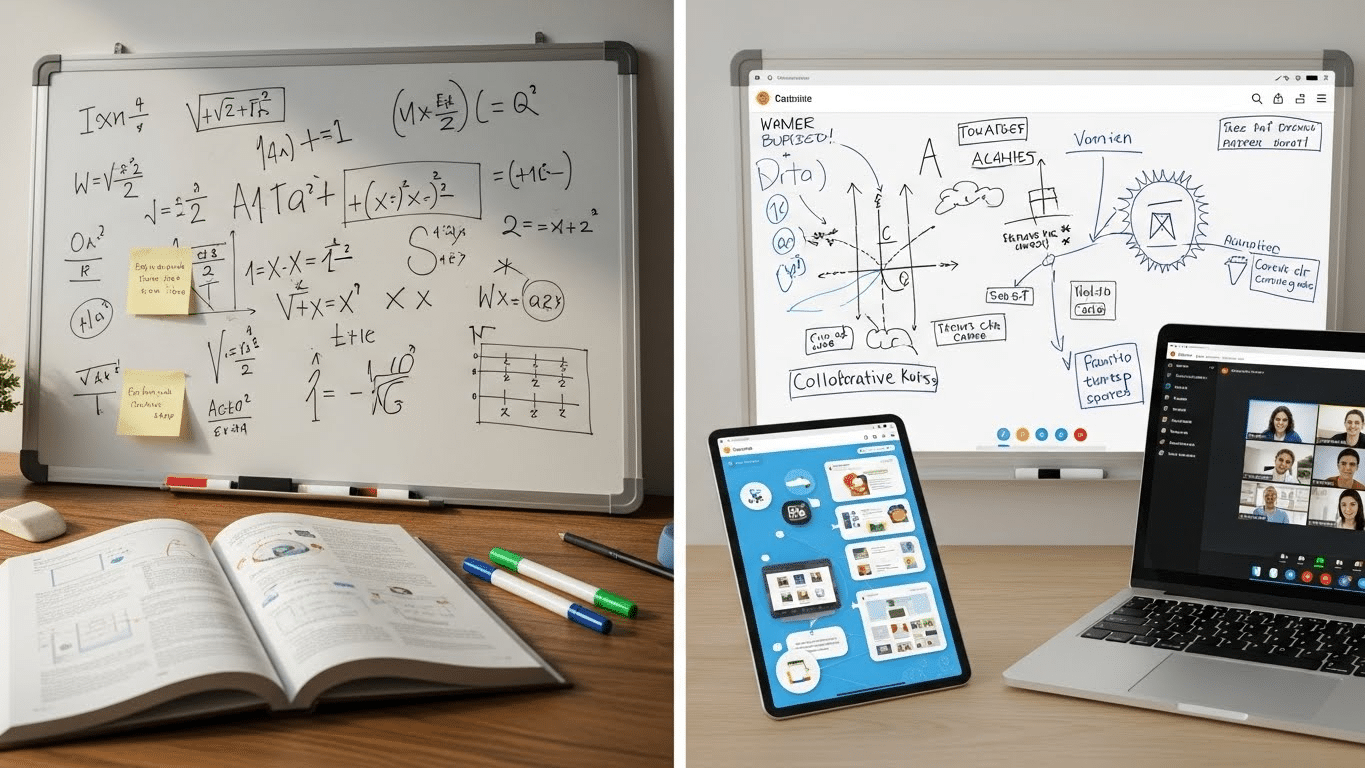
A virtual classroom differs from a traditional classroom mainly in how space, communication, and resources are managed. In a physical classroom, learning is tied to a physical location, face-to-face conversations, and printed materials. By contrast, a virtual classroom provides a virtual environment where interaction happens through chat, video, and audio, and resources are shared digitally as multimedia files.
| Feature | Physical Classroom | Virtual Classroom |
|---|---|---|
| Communication | In-person | Chat, video, audio |
| Resources | Printed | Multimedia resources, screen sharing |
| Participation | Limited to present students | Students in different locations, small groups, or whole class |
| Teaching | Whiteboards, lectures | Online whiteboards, video lectures |
Unlike traditional settings where attendance is restricted to those physically present, virtual classes allow students from multiple locations to participate simultaneously. Teachers can create interactive experiences with polls, group work in breakout rooms, and shared digital tools, supporting student engagement beyond geographical barriers.
This setup not only accommodates larger, more diverse groups but also provides flexibility for students who may need to balance education with work or personal commitments. Virtual learning thus expands accessibility while maintaining meaningful interaction between teachers and learners.
What Tools and Features Make Up a Virtual Classroom?
A virtual classroom is powered by a range of digital tools that support teaching, collaboration, and engagement. Common features include file sharing, which allows instructors to distribute learning materials and assignments instantly; breakout rooms that enable small-group discussions and projects; and multimedia resources such as slides, audio recordings, and video lectures to enrich the learning experience.
Interactive tools like chat functionality, screen sharing, and online whiteboards create real-time opportunities for collaboration, mirroring the dynamics of an in-person classroom. These features are often integrated into virtual classroom platforms or connected to Learning Management Systems (LMS), ensuring that lessons, resources, and assessments are well organized in one accessible space.
For teachers, built-in tools make it easier to assign and track coursework, monitor student participation, and manage whole-class instruction as well as small-group activities. This combination of technology not only simplifies administrative tasks but also strengthens engagement by making learning interactive, flexible, and collaborative. Ultimately, these tools enhance the overall experience for both educators and students by blending structure with adaptability.
What Does a Virtual Classroom Layout Look Like?
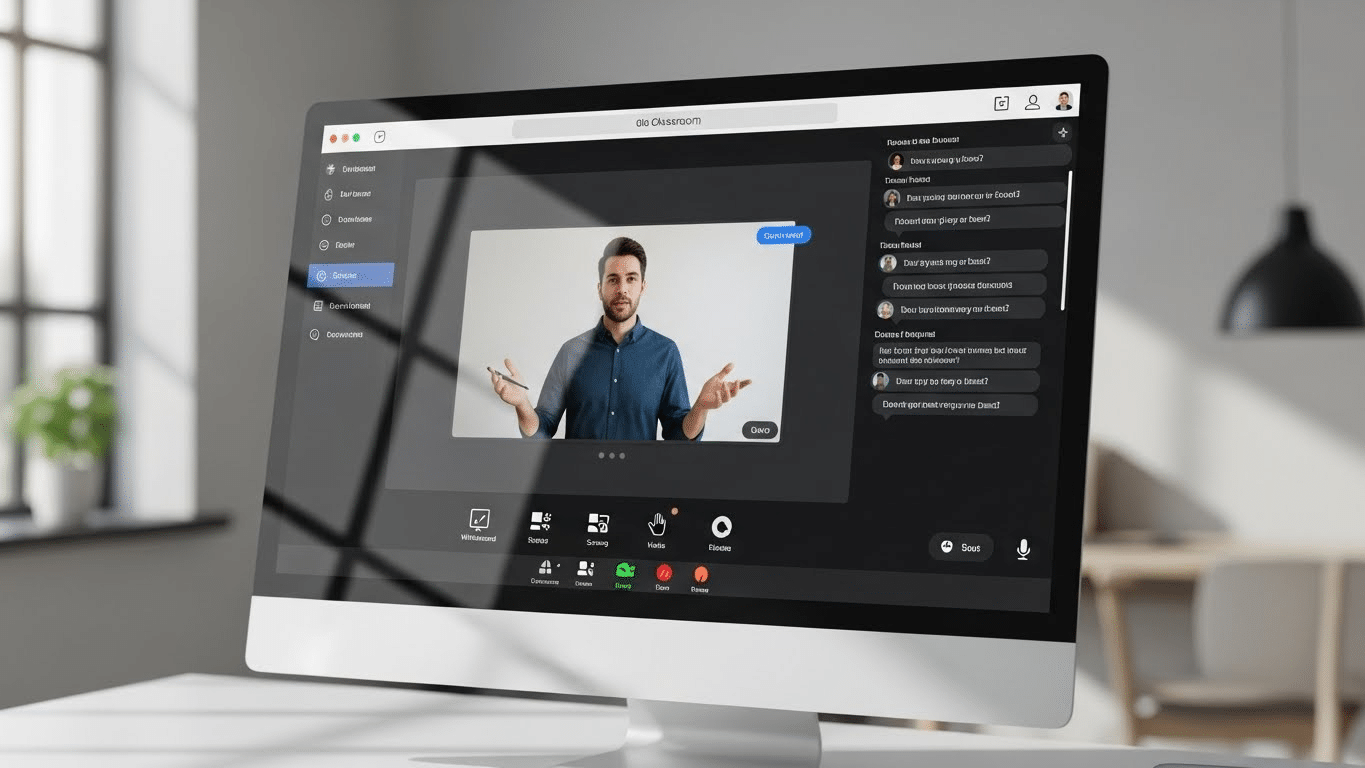
A virtual classroom layout typically appears as a browser-based or app interface designed for ease of navigation and interaction. At the center is a video window, where teachers and students can see and hear each other during live sessions. Alongside this, navigation menus provide quick access to lessons, resources, assignments, and recordings.
A side panel often displays a participant list and chat window, enabling real-time communication and group collaboration without interrupting the main lecture. Additional controls for features like breakout rooms, whiteboards, and screen sharing are usually placed in the toolbar for quick access.
Platforms such as Apporto, Zoom, and Blackboard Collaborate design their interfaces to prioritize real-time communication while ensuring that course materials are easy to find. The intuitive layout allows teachers to manage discussions, share content, and keep students engaged, all within a single integrated digital classroom space.
What Are the Benefits of Using a Virtual Classroom?
A virtual classroom offers a wide range of benefits for students, educators, and institutions. One of the biggest advantages is flexibility—students can attend class from anywhere using a computer, tablet, or smartphone. This makes learning more accessible for non-traditional learners, such as working professionals or those with family responsibilities, who may need to learn at their own pace.
Virtual classroom solutions are also highly scalable, allowing institutions to support larger groups of students without the need for additional physical space. Students can participate in different ways, whether through live chat, video discussions, polls, or file sharing, ensuring that everyone has a voice.
Collaboration is enhanced with tools like breakout rooms, shared documents, and multimedia resources, which encourage interaction and teamwork. Virtual classrooms also support inclusion by offering assistive features such as closed captions and adaptable pacing.
Finally, virtual classrooms are ideal for online courses, hybrid learning, and emergency situations like natural disasters or pandemics, ensuring learning continuity even when traditional classrooms are not available.
What Are the Limitations or Challenges of Virtual Classrooms?

Despite their benefits, virtual classrooms present some challenges. The main drawback is the lack of in-person communication and non-verbal cues, which can make it harder to build personal connections between teachers and students.
Effective participation also depends on a stable internet connection and a degree of digital literacy, which not all students may have. Without interactive teaching methods, virtual classes risk becoming passive, reducing student engagement.
Educators often require training to manage software platforms, track student progress, and maintain engagement in a digital setting. Furthermore, not all subjects are well-suited to a virtual environment—hands-on or lab-based learning can be difficult to replicate online.
Finally, balancing the use of technology with effective classroom management can be a challenge for teachers, especially when supporting large, diverse groups of learners.
Who Uses Virtual Classrooms and for What Purposes?
Virtual classrooms are widely used across schools, universities, corporate training programs, and professional development organizations. They provide a flexible way to deliver lessons, workshops, and skill-based training without the constraints of a physical location.
In education, virtual classrooms are popular for STEM subjects, language learning, and arts and humanities, as they support interactive teaching with multimedia resources and group collaboration. Online teachers and instructors use these platforms to conduct lessons, assign coursework, and track student progress.
Both synchronous (live sessions) and asynchronous (recorded lectures and materials) learning can be supported, offering adaptability for diverse learners. Educators benefit from streamlined organization and teaching tools, students gain accessible and flexible learning opportunities, and organizations can scale training programs cost-effectively. Overall, virtual classrooms enhance learning experiences for individuals and groups across multiple sectors.
How to Set Up an Effective Virtual Classroom
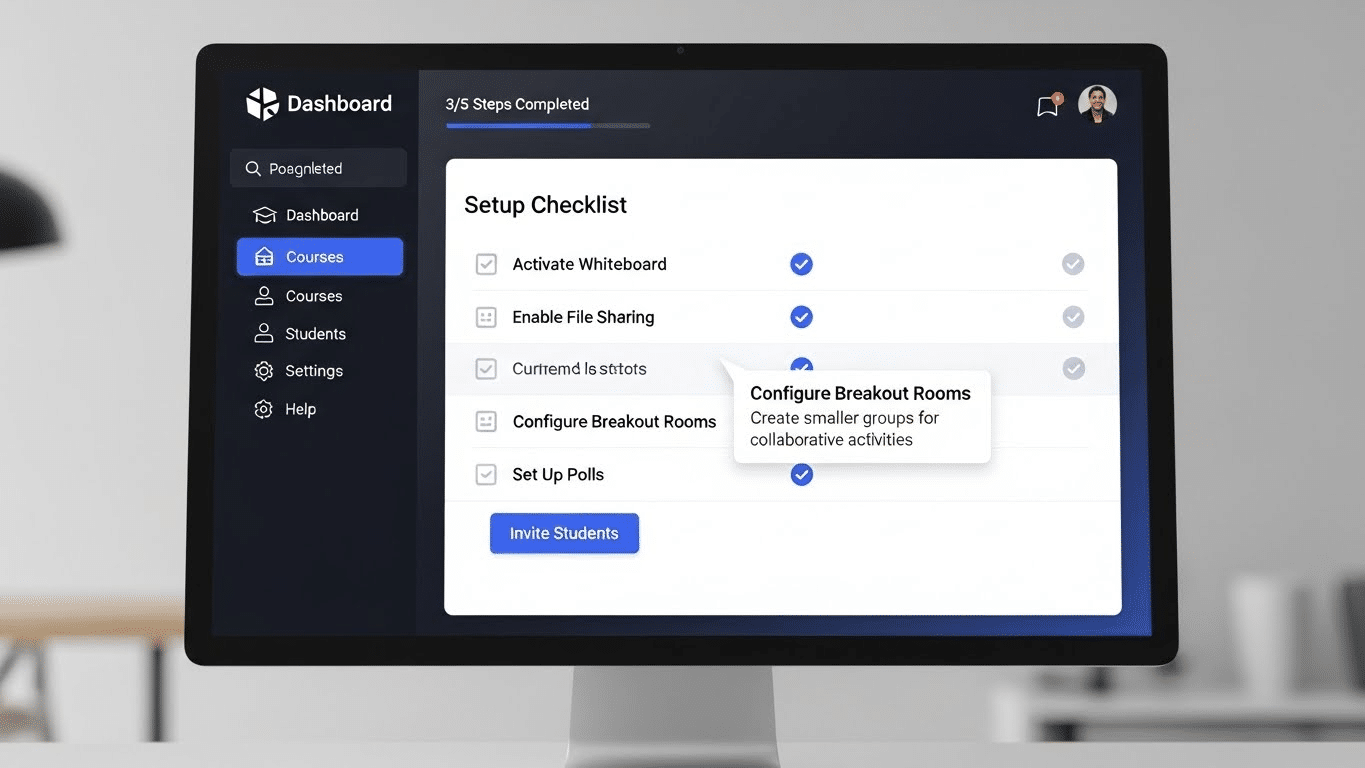
Setting up an effective virtual classroom begins with choosing the right platform that matches teaching goals and integrates essential tools like video conferencing, file sharing, and whiteboards. Instructors should organize course materials, assignments, and multimedia resources ahead of time to ensure smooth delivery.
Lesson planning should include a balance of live video lectures, opportunities for student collaboration, and features that enable real-time participation such as polls or breakout sessions.
For teachers, best practices include using interactive tools frequently, keeping students engaged through open questions and regular feedback, and fostering peer-to-peer learning with small-group activities. By combining thoughtful preparation with the right technology, educators can create a virtual classroom environment that feels engaging, interactive, and effective for all learners.
Why Choose Apporto for Your Virtual Classroom?
When selecting a platform, it’s important to find one that balances ease of use with powerful teaching features. Apporto stands out as a cloud-based virtual classroom solution that delivers a seamless learning experience. With tools for video conferencing, breakout rooms, file sharing, and real-time collaboration, Apporto recreates the classroom environment in an intuitive digital space. It also integrates with learning management systems (LMS), making it easier for educators to organize lessons, track assignments, and monitor student engagement. For institutions and organizations, Apporto provides a scalable, secure solution that supports both synchronous and asynchronous learning. Try Apporto.
Conclusion
A virtual classroom is more than just a digital tool—it represents a new way of teaching, learning, and connecting. While challenges like reduced face-to-face interaction and reliance on technology remain, the benefits of flexibility, accessibility, and scalability are undeniable.
As education continues to evolve, virtual classrooms will play an increasingly central role in hybrid learning, professional training, and global collaboration. Platforms like Apporto highlight how technology can enhance both teaching and student engagement.
Whether you’re a teacher, administrator, or student—learning how to create and navigate a virtual classroom will put you ahead in the future of education.
Frequently Asked Questions (FAQs)
1. What is a virtual classroom?
A virtual classroom is an online learning environment where teachers and students interact through video conferencing, chat, digital whiteboards, and shared learning materials. It allows live or recorded instruction from different locations while supporting collaboration, assignments, and classroom participation through internet-connected devices.
2. What is the difference between a virtual class and a normal class?
A virtual class takes place online through digital platforms, while a normal class happens in a physical classroom. Virtual classes use video conferencing, chat, and digital resources for interaction, whereas traditional classrooms rely on face-to-face communication, physical materials, and in-person participation.
3. How to teach in a virtual classroom?
Teaching in a virtual classroom involves using video conferencing, screen sharing, interactive discussions, and digital learning tools to engage students online. Effective virtual teaching also includes organizing lessons clearly, encouraging participation, using breakout rooms for collaboration, and providing accessible digital learning materials.
4. Can you attend a virtual classroom on any device?
5. What are the core features of virtual classroom software?
Main features include video conferencing, chat, file sharing, online whiteboards, screen sharing, and tools for assignments and student engagement.
6. Do virtual classrooms replace in-person classrooms?
Not entirely. Virtual classrooms don’t fully replace physical classrooms, but they complement traditional education and make learning more flexible and accessible from anywhere.
