
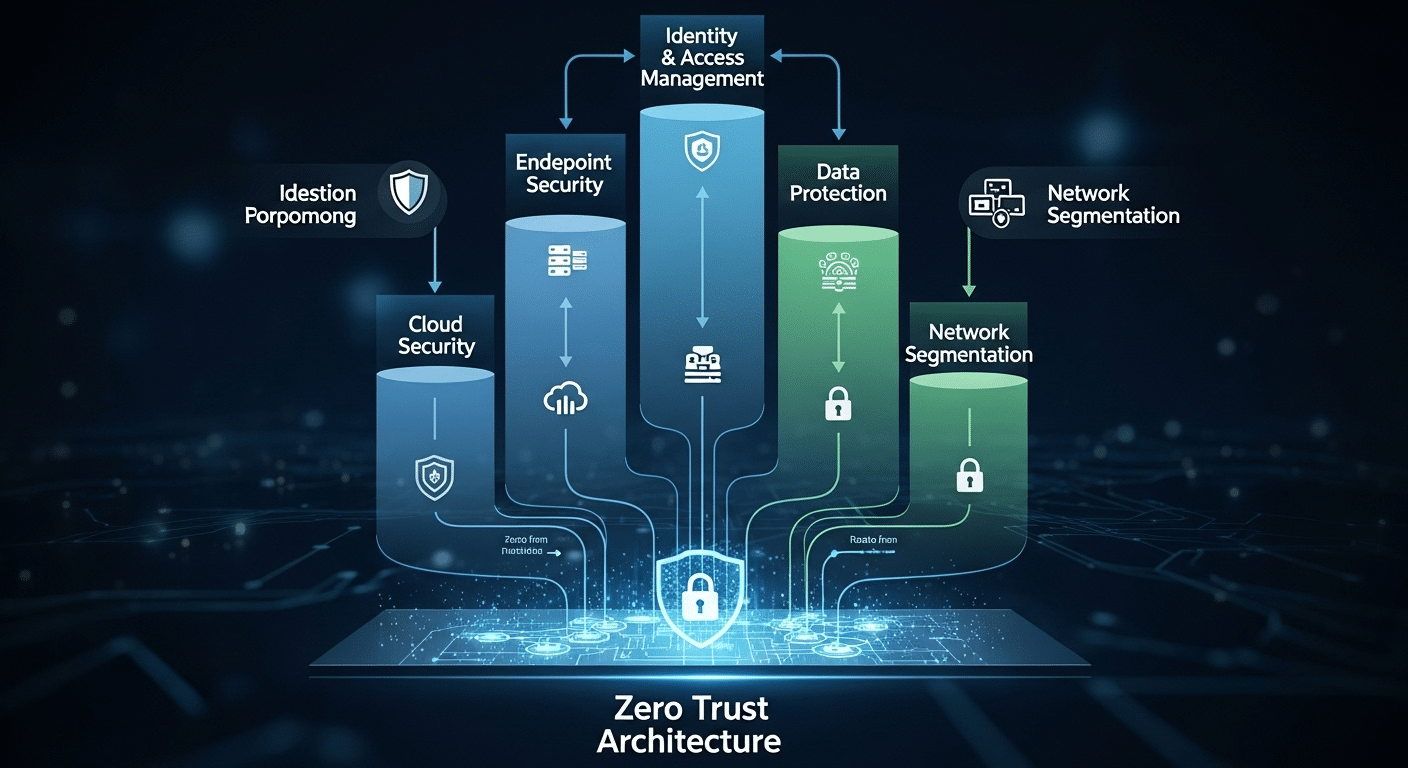
What Is Zero Trust Architecture and How Does It Work?
Zero Trust Architecture is a cybersecurity model that continuously verifies users, devices, and access requests instead of automatically trusting anything inside a network. It improves security through least-privilege access, continuous monitoring, and identity-based controls. Platforms like Apporto support Zero Trust with secure browser-based access and simplified remote workspace management.
In a time where cyberattacks feel less like rare events and more like daily headlines, it’s clear that the old ways of protecting data are no longer enough.
The traditional “trust but verify” model, where anything inside the network is considered safe, no longer works. Remote work, cloud tools, and advanced threats have blurred the corporate firewall, making unnoticed breaches far more likely.
That’s where Zero Trust Architecture comes in. It isn’t a product you can buy off the shelf, it’s a fundamental shift in how you think about security. Instead of trusting anything by default, Zero Trust verifies everything, every time.
With support from initiatives like Microsoft’s Secure Future Initiative (SFI) and mandates such as U.S. Executive Order 14028, Zero Trust has become a strategic priority for both public and private sectors.
But what exactly does it mean? How does it work? And how can you start using it to protect your organization?
Let’s break it down.
What Is Zero Trust Architecture and Why Does It Matter Now?
Zero Trust Architecture (ZTA) is a modern security strategy built on a simple idea: never trust anything by default. Every user, device, and connection must be continuously verified before being allowed to access systems or data, even if they’re already inside the network.
This approach stands in direct contrast to the old perimeter-based model, which trusted anything once it was past the firewall.
That model worked when employees sat in the same building, using company-issued devices. But today, work happens everywhere—on personal laptops, in coffee shops, across cloud platforms. The trust model must evolve.
Zero Trust replaces assumptions with verification. It’s grounded in the principle of “assume breach”, treating every user or system as potentially compromised unless proven otherwise. This mindset shift forms the basis of the Zero Trust Security Model and its broader trust architecture.
The term isn’t new, but adoption accelerated sharply after 2020. Remote work exploded, threat surfaces widened, and breaches like SolarWinds revealed the limits of legacy tools. In response, major tech providers like Microsoft launched initiatives such as the Secure Future Initiative (SFI) to align security with Zero Trust principles.
Governments followed. U.S. Executive Order 14028 now directs federal agencies to adopt Zero Trust strategies. The Cybersecurity and Infrastructure Security Agency (CISA) published detailed guidance on Zero Trust maturity models to support this transition.
Whether you’re in government, education, or the private sector, Zero Trust isn’t a buzzword, it’s fast becoming the security strategy of record.
How Does the Zero Trust Model Actually Work?

At its core, Zero Trust is about verifying everything. It doesn’t matter if a user is working from HQ or from a personal device at home, access must be earned, not assumed. The model runs on a few important principles:
- Never trust, always verify
Every access request must be authenticated and validated using multiple data points, like device health, user behavior, location, and more. - Least privilege access
Users and devices only get access to the resources they absolutely need, nothing more. This helps limit the blast radius of any potential breach. - Continuous monitoring and verification
Security isn’t a one-time check. It’s ongoing. If risk conditions change, access can be restricted or revoked immediately.
Two related methods are central to this model:
- JIT (Just-in-Time) access provides permissions only when needed and only for as long as necessary.
- JEA (Just Enough Access) ensures users can only perform the specific actions required, nothing extra.
This mindset replaces traditional VPNs with Zero Trust Network Access (ZTNA). Unlike VPNs that grant broad entry to the internal network, ZTNA gives users access to only the specific resources they’re authorized for, based on real-time context.
By design, the Zero Trust model assumes breach. That means no user or system is inherently trusted, even if they passed the last check. Every access request must be verified with fresh context and available data points.
Zero Trust isn’t rigid—it’s adaptive, dynamic, and built to reflect how modern organizations operate.
What Are the Core Components of a Zero Trust Environment?
To build a Zero Trust environment, you need more than just good intentions. You need a set of connected systems that work together to validate users, secure data, and detect threats in real time. These are the essential building blocks:
- User identities and devices
Every user account and device must be verified continuously. That includes checking for proper authentication, up-to-date patches, and device health before granting access. - Access management
Access should be role-based, adaptive, and risk-aware. The system should grant just enough access, only when needed (JIT/JEA), and deny anything outside of clearly defined boundaries. - Data protection
Sensitive data must be classified, encrypted, and segmented. Access to data should depend on both the user’s identity and the context in which access is requested. - Network access and segmentation
Zero Trust limits blast radius by using micro-segmentation, a way of isolating systems so that a breach in one area doesn’t compromise the rest. - Security controls and visibility
You need continuous monitoring of all activity. Every access request should generate logs and telemetry that feed into threat detection systems.
Zero Trust relies on available data points, identity signals, device posture, location, behavior—to make smarter, context-aware access decisions.
Microsoft’s Secure Future Initiative (SFI) is a strong example of this model in action. It demonstrates how integrated, policy-driven access tied to real-time intelligence can protect user accounts, applications, and infrastructure in a dynamic environment.
How Does Zero Trust Improve Security Posture Compared to Traditional Models?
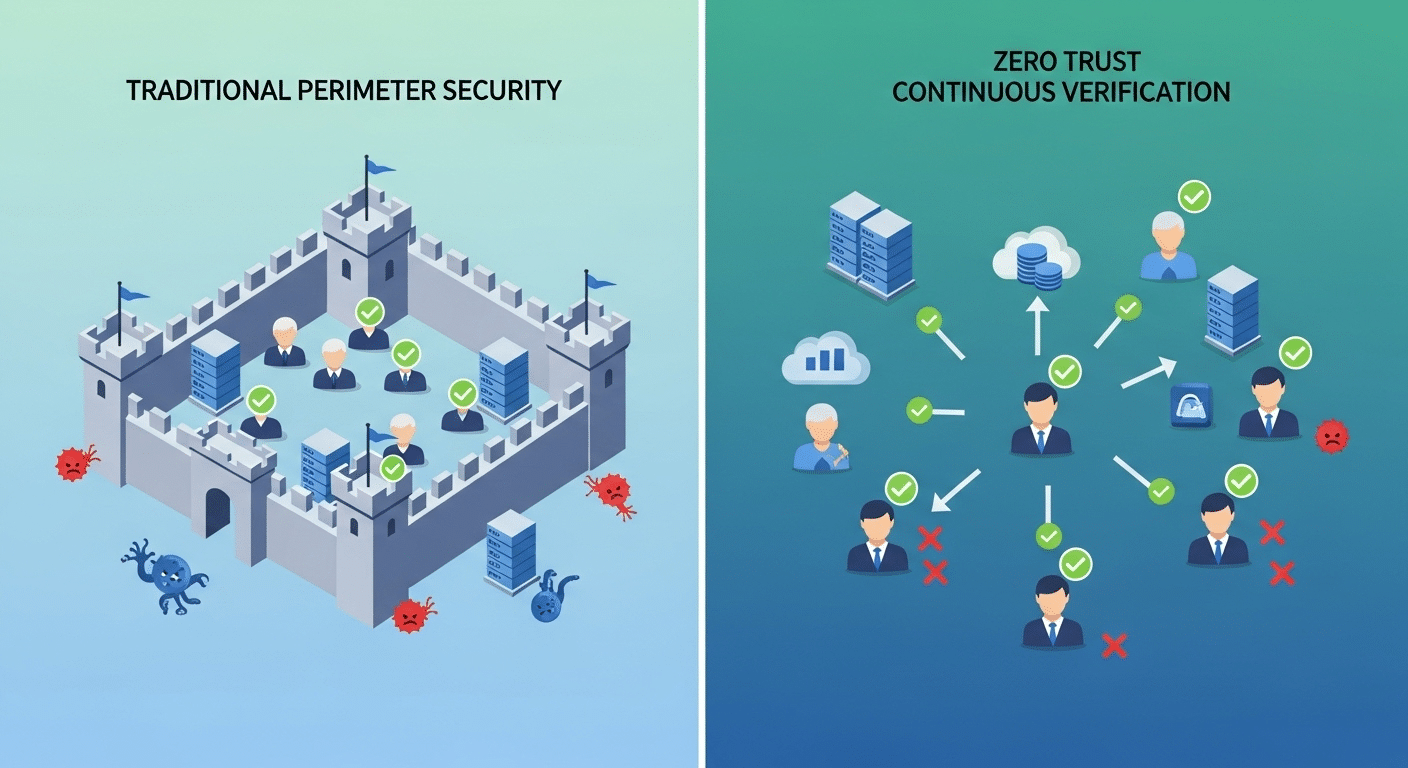
Traditional security models trusted users and devices once they were inside the network perimeter. But that model breaks down in today’s reality, where remote access, BYOD (bring your own device), and cloud services are the norm. A single stolen credential or compromised device can grant attackers free rein inside your systems.
Zero Trust flips that model. Instead of assuming everything inside the perimeter is safe, the trust model assumes breach. Every user, every device, and every access request is treated as a potential threat until proven otherwise.
This shift creates a much stronger security posture. With Zero Trust, you gain:
- Better threat detection through continuous verification and behavior monitoring
- Stronger access control, minimizing what users can do and where they can go
- Improved data access protection, especially for sensitive data stored across cloud and on-prem systems
Because Zero Trust applies stringent access controls and limits exposure through micro-segmentation, even if attackers get in, they can’t move freely.
Put simply, Zero Trust protects user accounts and devices by default. It doesn’t rely on a wall—it watches every door.
What Role Does the Microsoft Secure Future Initiative (SFI) Play in Zero Trust?
Microsoft’s Secure Future Initiative (SFI) is a multi-layered effort to modernize cybersecurity across its platforms and ecosystem. At its core, the initiative is about aligning Microsoft’s entire infrastructure—cloud, endpoints, identity, and applications, with Zero Trust principles.
SFI focuses on three areas: secure-by-design, secure-by-default, and secure-operations. These pillars reflect the shift from perimeter defense to a Zero Trust and Microsoft-driven approach that prioritizes continuous validation.
Here’s how Microsoft applies Zero Trust across its environment:
- Users and Devices: Every login is evaluated using available data points like location, behavior, device status, and past activity. Access is granted only after successful, real-time verification.
- Access Control: Policies enforce least privilege access, using risk-based signals to block or grant entry dynamically.
- Data and Infrastructure: Sensitive information is classified and protected across cloud and on-prem environments using encryption, segmentation, and real-time monitoring.
In this trust and Microsoft Secure framework, no system is implicitly safe. Instead, Microsoft assumes breach, and access is only granted after stringent checks.
As a leading technology provider, Microsoft’s adoption of Zero Trust through SFI reinforces the model’s legitimacy and sets a clear standard for the enterprise world.
How Are U.S. Federal Agencies Implementing Zero Trust Architecture?

In May 2021, U.S. Executive Order 14028 made one thing clear: federal agencies must adopt Zero Trust. The mandate followed a wave of cyberattacks that exposed weaknesses in legacy systems and demanded a more proactive, resilient security posture.
The order directs federal agencies to modernize their defenses by moving toward a Zero Trust Architecture. This means abandoning outdated perimeter-based strategies in favor of models that assume breach and verify everything.
The Cybersecurity and Infrastructure Security Agency (CISA), along with the Infrastructure Security Agency, released the Zero Trust Maturity Model to guide this transition. It outlines practical steps agencies must take, including:
- Applying Zero Trust protections to user accounts, including MFA and continuous identity verification
- Enforcing role-based network access controls and limiting lateral movement
- Securing cloud services with encryption, segmentation, and logging
- Enhancing visibility and threat detection across all systems
Zero Trust is no longer optional in the public sector, it’s a requirement. These changes are reshaping how agencies manage data, authorize access, and defend against attacks.
In short, the federal government’s embrace of Zero Trust is accelerating its adoption across every industry, pushing both policy and technology toward a more secure future.
What Are the Common Challenges in Zero Trust Implementation?
Implementing a Zero Trust strategy is not without obstacles. Many organizations face roadblocks that can slow progress or create friction along the way.
One major issue is technical debt. Older systems were not designed for the level of segmentation and verification Zero Trust requires. Integrating these systems often exposes infrastructure limitations that aren’t easy to fix quickly.
Identity management is another hurdle. With so many users, devices, and applications across cloud and on-prem environments, tracking and securing everything becomes complex. Without clear visibility, it’s hard to restrict access properly or respond to risky access requests.
Hybrid environments only add to the challenge. Fragmented tools and policies can create blind spots, reducing the effectiveness of continuous verification.
Then there’s the human side. Organizational resistance, especially from teams used to broad access, can stall adoption. Zero Trust means tighter controls, and not everyone welcomes change, even if it’s for the better.
But the biggest risk? Doing nothing. A strong trust strategy starts by acknowledging these challenges, then addressing them one step at a time.
How Do You Start Building a Zero Trust Strategy?

Transitioning to Zero Trust doesn’t happen overnight. But with the right steps, you can make real progress, without overwhelming your team or your systems.
Start with a clear roadmap:
- Identify critical assets and sensitive data
Know what needs protecting first. This includes intellectual property, personal data, and internal systems. - Map user roles and access levels
Who needs what? Define clear roles and ensure each one has only the access required to do the job. - Assess identity and device posture
Evaluate whether user accounts and devices are secure, compliant, and properly configured. - Segment the network
Divide your infrastructure into zones. Use micro-segmentation to contain threats and reduce the blast radius if a breach occurs. - Implement stringent access controls
Use tools like multi-factor authentication, risk-based policies, and conditional access to gain access only when needed. - Apply JIT (Just-in-Time) and JEA (Just Enough Access)
Limit permissions to specific time windows and actions, reducing unnecessary exposure. - Enable continuous monitoring and verification
Build visibility into your environment. Watch every login, access request, and configuration change.
Quick wins to start:
- Secure remote access
- Harden user accounts
- Apply Zero Trust policies to cloud apps
Remember, Zero Trust is a journey. It’s not about flipping a switch. Each small step builds momentum and strengthens your overall security posture.
What Does a Successful Zero Trust Implementation Look Like?
Success with Zero Trust doesn’t just mean fewer alerts. It shows up in real outcomes:
- Reduced lateral movement—attackers can’t jump freely across systems
- Fewer phishing-related breaches—strong identity checks stop unauthorized access
- Improved audit and compliance reporting—you always know who accessed what, and when
- Higher confidence in data access and threat detection—your systems work smarter, not just harder
In a well-executed Zero Trust environment, you gain control without slowing people down. Access is dynamic, risk-based, and logged in real time.
Leading organizations, from federal agencies to Fortune 500 firms, are already proving that Zero Trust protects users, devices, and sensitive data without locking everything down. It’s about balance: security without sacrifice.
Where Does Apporto Fit in a Zero Trust Strategy?
If you’re exploring how to adopt Zero Trust without reinventing your infrastructure, Apporto offers a compelling path forward. Our platform is built around Zero Trust principles—including least privilege access, just-in-time permissions, and continuous verification, without the complexity of traditional VDI solutions.
Whether you’re in higher education or a mid-sized enterprise, Apporto enables secure, browser-based access to desktops and applications, backed by Zero Trust Network Access (ZTNA) and built-in access controls. You don’t need to buy more hardware or deploy complicated tools, just deliver secure, fast, and resilient user access from anywhere.
Zero Trust isn’t something to bolt on. It has to be embedded from the ground up. That’s exactly what Apporto was designed for.
Final Thoughts
The answer is yes—Zero Trust Architecture is absolutely worth it. It helps you build a stronger security posture, improves resilience, and removes the guesswork from who or what should be trusted. In today’s threat environment, where breaches are expected, not hypothetical, this model isn’t just smart, it’s essential.
Whether you’re just starting or already tightening access controls, now is the time to assess your current trust model. Take one step forward. You don’t have to overhaul everything overnight.
And if you want a partner that makes Zero Trust easier to adopt, Apporto is ready when you are.
Frequently Asked Questions (FAQs)
1. What is Zero Trust in simple terms?
Zero Trust means never automatically trusting anything inside or outside your network. Everything—users, devices, systems, must be verified before access is granted.
2. Is Zero Trust just for large enterprises or federal agencies?
No. While governments and big tech use it, the principles apply to organizations of all sizes, especially those with remote teams, cloud services, or limited IT staff.
3. How long does it take to implement Zero Trust?
It varies. A full rollout can take months, but you can start small, focus on securing user accounts, remote access, and data segmentation first.
4. Is Zero Trust expensive to implement?
Not necessarily. Many organizations can apply Zero Trust by reconfiguring existing tools and policies, rather than purchasing new software.
5. Can Zero Trust work without the cloud?
Yes. While common in cloud setups, Zero Trust works just as well in hybrid or on-prem environments, as long as you apply the right controls.
