Best Ways to Achieve 100% Endpoint Compliance

Best Ways to Achieve 100% Endpoint Compliance

IT professionals understand that securing their internal systems and data starts with securing the endpoints that their various user groups utilize for daily tasks. But with a shift in the landscape to a more mobile, hybrid, and remote workforce, how best to accomplish the target of 100% compliance on endpoints?

There has been a clear progression of management systems over time from System Center Configuration Manager (SCCM) to virtual desktop infrastructure (VDI) to desktops-as-a-service (DaaS). Each has benefits and drawbacks, so let’s dig in.

SCCM

Microsoft System Center Configuration Manager (SCCM) is a comprehensive management tool designed to help administrators deploy, manage, and monitor devices and applications in an enterprise environment. It provides a centralized platform for IT professionals to automate various tasks related to software deployment, patch management, operating system deployment, and system updates.

Key Features and Functions:

Software Deployment: SCCM enables administrators to efficiently deploy software applications across multiple devices within an organization. It supports automated software installation, remote installation, and deployment targeting based on user or device-specific criteria.

Patch Management: SCCM helps administrators keep the software and operating systems on devices up to date by managing and deploying patches and updates. It allows for patching both Microsoft and third-party applications, ensuring security and stability across the network.

Operating System Deployment: SCCM facilitates the automated deployment of operating systems to new or existing devices. Administrators can create standardized OS images, customize configurations, and remotely install the OS on multiple devices simultaneously.

Inventory and Asset Management: SCCM provides comprehensive inventory and asset management capabilities, allowing administrators to track and manage hardware and software assets across the organization. It collects detailed information about devices, software installations, and hardware configurations.

Endpoint Protection: SCCM integrates with Microsoft Defender Antivirus to provide endpoint protection features. Administrators can centrally manage antivirus policies, monitor protection status, and respond to security threats.

Reporting and Monitoring: SCCM offers reporting and monitoring tools to gather insights into device and application health, compliance, and usage. It provides real-time monitoring and generates reports that help administrators make informed decisions.

Challenges and Drawbacks:

While SCCM does a great job with most devices, there are a few areas that can be challenging and potentially block the achievement of 100% compliance.

Complexity: SCCM is a feature-rich and highly configurable tool, which can lead to complexity in its implementation and management. Setting up SCCM requires careful planning, expertise, and familiarity with its various components and configurations.

Learning Curve: Due to its complexity, SCCM has a steep learning curve for administrators who are new to the tool. Acquiring the necessary skills and knowledge to effectively utilize SCCM may take time and training.

Infrastructure Requirements: SCCM relies on a robust infrastructure to operate efficiently. It requires dedicated server resources, such as database servers, distribution points, and management points. Organizations need to allocate the necessary hardware, network bandwidth, and storage capacity to support SCCM effectively.

Scalability and Performance: Large-scale deployments or managing a vast number of devices can strain the performance of SCCM infrastructure. Ensuring scalability and optimal performance may require careful monitoring, tuning, and additional hardware resources.

Software Compatibility: SCCM primarily focuses on managing Microsoft-based systems and applications. While it supports third-party software deployments, ensuring compatibility and smooth integration with all applications can be challenging. Some third-party applications may require additional customization or workarounds for effective management.

Overhead and Maintenance: SCCM requires regular maintenance tasks, such as software updates, database maintenance, and distribution point management. These activities may require dedicated resources and can consume time and effort.

Add to the above, the robust knowledge of internal device driver management across many manufacturers and models that is required. And, finally, in the new remote work landscape, SCCM only works with devices it can connect to.  Offline or unreachable devices will not receive critical updates and patches.
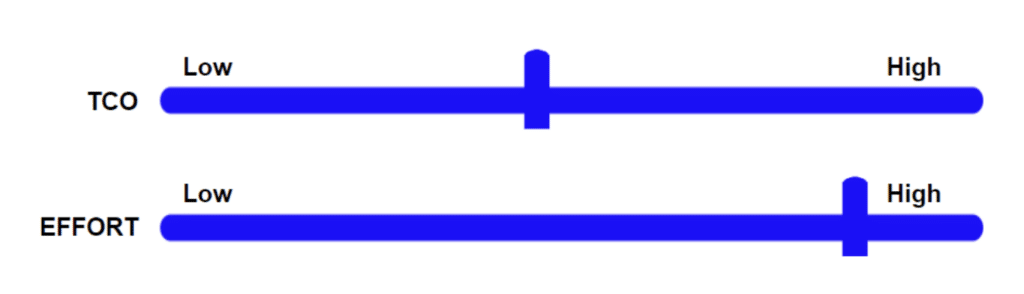
As illustrated above, the total cost of ownership using SCCM is fairly reasonable but the effort required to achieve 100% endpoint compliance is high.

VDI

Virtual Desktop Infrastructure (VDI) is a technology that enables the delivery of desktop environments to end-users from a centralized server or cloud infrastructure. Instead of running applications and storing data on individual physical devices, VDI allows users to access a virtual desktop from any device with an internet connection.

Benefits of VDI:

Centralized Desktop Management: VDI centralizes desktop management, allowing administrators to deploy, configure, and update desktop environments from a single location. This simplifies IT tasks, reduces maintenance efforts, and ensures consistent configurations across all virtual desktops.

Remote Access and Mobility: VDI provides remote access to desktops, enabling users to access their virtual desktops and applications from anywhere, using various devices like laptops, tablets, or thin clients. This enhances productivity and facilitates mobile and remote work scenarios.

Improved Security: With VDI, sensitive data remains stored in the data center or cloud infrastructure, rather than on individual devices. This helps reduce the risk of data loss or theft from lost or stolen devices. Centralized security policies and controls can be implemented to protect virtual desktops and data.

Hardware Utilization: VDI allows for better utilization of hardware resources. Multiple virtual desktops can run on a single physical server, reducing the overall hardware requirements and energy consumption. This can result in cost savings and improved resource efficiency.

Streamlined Application Deployment: Applications can be installed and managed centrally in a VDI environment, reducing the complexities of application management across multiple endpoints. Administrators can easily update and deploy applications to all virtual desktops simultaneously, ensuring consistency and simplifying maintenance.

Enhanced Disaster Recovery: VDI environments can be backed up and replicated, making disaster recovery easier and more efficient. In case of hardware failures or other disruptions, users can quickly switch to alternative virtual desktops without significant downtime.

User Experience and Flexibility: VDI provides a consistent user experience across different devices, as users can access their personalized virtual desktop environment from any compatible endpoint. Users can easily switch devices without interrupting their work and have the flexibility to customize their virtual desktop to suit their preferences.

Challenges and drawbacks

The overall intent of VDI was to overcome the drawbacks of using an endpoint management tool like SCCM, however, there are some new challenges that must be taken into consideration.

Infrastructure Complexity: Implementing and managing a VDI infrastructure can be complex and resource-intensive. It requires robust server hardware, storage systems, and networking infrastructure to support the virtual desktops and ensure optimal performance. Organizations need to invest in the right infrastructure and have skilled IT personnel to handle the complexities.

Cost Considerations: VDI can involve significant upfront costs, including hardware, software licenses, virtualization technology, and storage infrastructure. Additionally, ongoing operational costs such as maintenance, upgrades, and support should be factored in. Organizations need to evaluate the total cost of ownership and determine if the benefits justify the investment.

Scalability and Performance: Scaling a VDI environment to accommodate a large number of users or handle peak workloads can be challenging. Ensuring adequate server resources, network bandwidth, and storage capacity are critical for maintaining performance and responsiveness. Organizations need to plan for scalability and regularly monitor and optimize the infrastructure.

User Experience: While VDI aims to provide a consistent user experience, factors like network connectivity, latency, and device capabilities can impact performance. In remote or low-bandwidth scenarios, users may experience lag or reduced functionality. Ensuring a satisfactory user experience across different devices and locations can require careful planning and optimization.

Application Compatibility: Certain applications may not be compatible with a virtualized environment or may require specific configurations. Graphics-intensive applications, legacy software, or applications with hardware dependencies can present challenges in VDI deployments. Compatibility testing and potential workarounds may be needed to ensure smooth application delivery.

Network Bandwidth Requirements: VDI heavily relies on network connectivity to deliver virtual desktops and transmit data between the server and endpoints. Bandwidth requirements can be significant, especially during peak usage times or when multimedia content is involved. Adequate network capacity and proper network design are crucial to prevent performance bottlenecks.

Data Security and Compliance: While VDI can enhance security by centralizing data and applications, it also introduces new security considerations. Securing the virtual desktop infrastructure, protecting data during transmission, and ensuring compliance with regulations require proper planning and implementation of security measures, including access controls, encryption, and monitoring.

While the benefit of centralized management and nearly immediate compliance with virtual desktops is appealing, the total cost of ownership (TCO) is a huge detractor for most companies.

Here we can see that achieving 100% compliance with VDI requires a fairly low effort, however, the total cost of ownership is probably the highest of all solutions.
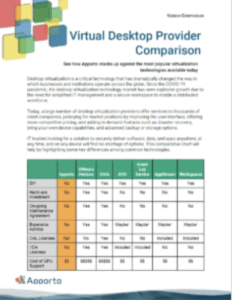
Virtual Desktop Provider Comparison

See how Apporto stacks up against the most popular virtualization technologies available today

DaaS

Desktops-as-a-Service (DaaS) is a cloud computing model that delivers virtual desktop infrastructure (VDI) from a service provider to end-users over the internet. In DaaS, the virtual desktops and associated applications are hosted and managed in the cloud, eliminating the need for organizations to deploy and maintain their own VDI infrastructure.

Key Features and Benefits:

Cloud-based Virtual Desktops: DaaS provides virtual desktops that run in the cloud, allowing end-users to access their desktop environments from various devices, including laptops, tablets, and thin clients. The virtual desktops are hosted and managed by a third-party service provider, relieving organizations of the infrastructure and management responsibilities.

Pay-as-you-go Model: DaaS typically follows a subscription-based or pay-as-you-go pricing model. Organizations pay for the virtual desktops and services they consume on a per-user or per-month basis. This offers flexibility and scalability as organizations can easily scale up or down based on their needs without upfront capital investments.

Outsourced Infrastructure Management: With DaaS, the service provider handles the management and maintenance of the virtual desktop infrastructure, including server hardware, storage, networking, and software updates. This frees up IT resources and reduces the burden of infrastructure management for organizations.

Anywhere, Anytime Access: DaaS enables users to access their virtual desktops from anywhere with an internet connection. Users can log in and securely access their personalized desktop environment, applications, and data from different devices, facilitating remote work, mobile productivity, and collaboration.

Simplified Deployment and Management: DaaS simplifies the deployment and management of virtual desktops. Organizations can quickly provision new desktop instances, manage user access and permissions, and deploy applications centrally through an administrative portal. This streamlines IT operations and reduces the time and effort required for desktop management.

Enhanced Security and Data Protection: DaaS offers built-in security features and data protection mechanisms. Data resides in the cloud infrastructure, reducing the risk of data loss from lost or stolen devices. Service providers implement security measures such as access controls, data encryption, and backup solutions to ensure the security and integrity of virtual desktops and user data.

High Availability and Disaster Recovery: DaaS providers typically offer high availability and redundancy in their infrastructure, ensuring that virtual desktops are accessible and reliable. In case of hardware failures or disruptions, service providers maintain backups and implement disaster recovery measures to minimize downtime and ensure business continuity.

Compatibility and Application Support: DaaS supports a wide range of applications, including both standard and specialized software. Compatibility testing and application packaging are typically performed by the service provider to ensure smooth application delivery. Users can access their familiar applications and tools without compatibility concerns.

Potential Drawbacks:

Internet Connectivity Dependency: DaaS heavily relies on internet connectivity for users to access their virtual desktops. Users in areas with limited or unreliable internet connectivity may experience disruptions or reduced performance. Downtime or network outages can prevent users from accessing their virtual desktops until connectivity is restored.

Performance and Latency: The performance of DaaS is influenced by network latency and bandwidth. Users accessing virtual desktops from remote locations or over long distances may experience latency or sluggishness, especially when working with resource-intensive applications or multimedia content. Optimizing network connections and selecting geographically closer data centers can help mitigate this issue.

Vendor Dependency: Adopting DaaS means relying on a third-party service provider for the infrastructure and management of virtual desktops. Organizations should carefully choose a reputable provider and evaluate their track record, service-level agreements (SLAs), and support capabilities. Vendor lock-in and the potential risks associated with service provider changes should also be considered.

Application Compatibility and Performance: Some applications, especially those with specialized hardware requirements or specific integration needs, may not perform optimally in a DaaS environment. Compatibility testing and performance evaluation should be conducted to ensure that critical applications meet the required performance levels and functionality in a virtualized environment.

Here again, we see the evolution of delivery and compliance from on-premises VDI to DaaS where the overall TCO is lowered.
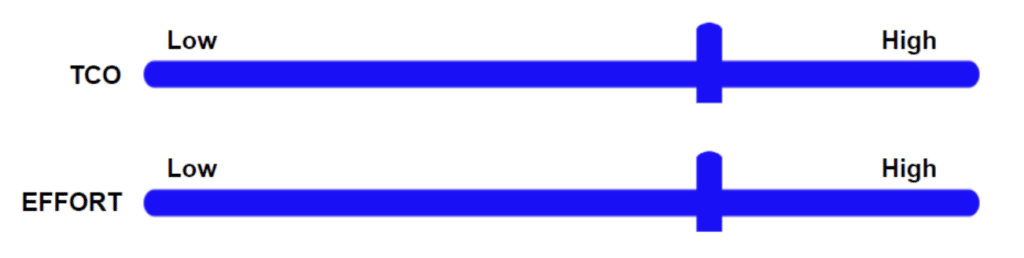
However, there is still a large learning curve required to achieve compliance and more importantly protect company data and systems from external threats.

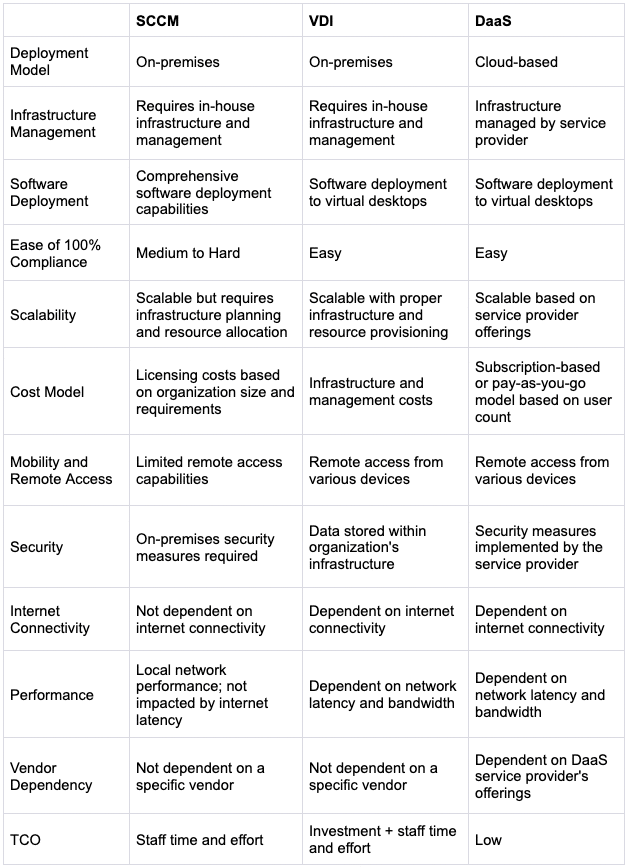
Comparison Chart
Meet Apporto

Apporto is a fully managed cloud-based virtual desktop solution that enables users to access their desktop applications and files from any device with an internet connection and a modern browser. It allows organizations to provide a centralized and secure desktop environment to their users without the need for expensive hardware or infrastructure.

One of the key benefits of Apporto is that it eliminates the need for users to install and manage their own software and hardware. It also provides a high level of flexibility, as users can access their virtual desktops from anywhere, at any time, and on any device. Additionally, Apporto offers enhanced security features like best practices for zero-trust, least privilege access, and admin-managed Network Objects.

Users will enjoy a best-in-class user experience for both performance and ease of use, ensuring anywhere access and increased productivity.

Apporto offers a range of pricing plans, including options for educational institutions, businesses, and individuals. It is also easy to set up and use, with no special technical skills required.
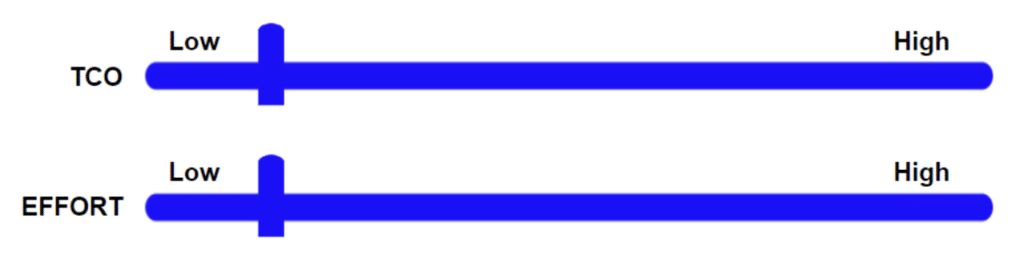
Because Apporto is a fully managed service, the effort required to achieve 100% compliance is nearly zero and the cost optimization included with the platform makes total cost of ownership the lowest among all solutions.

As we can see, there is a clear evolution of approach for achieving endpoint compliance from SCCM to VDI to DaaS, with the final step being to Apporto.  We simplify cloud desktops.

WiFi. Browser. Done.

The Most Critical Market Trends in Higher Education – Part 1

The Most Critical Market Trends in Higher Education – Part 1

Through my IT career and now in my sales career, I’ve always been intrigued by which market forces organizations up against and how they are planning to respond. As a Solutions Architect, tracking market trends is part of my role as well as providing advice to customers and potential customers about shifts they could see coming, but also about new exciting technologies.

In this article we look back over the past 12-18 months and a bit into the future, to examine the most important trends facing leaders in higher ed today.

The first trend dates well beyond the 12-18 month timeframe and could go back years or decades: Digital Equity. This has different meanings to different stakeholders on a college or university campus, but can also be defined differently based on what technology is being discussed. In my world, it’s all about access to academic software and compute power. During and following the COVID-19 global pandemic that shut down campuses and businesses everywhere, a spotlight was shone on the need for digital equity.

In higher ed, there are three definitive points for defining digital equity:

  1. Providing support to students using any device and enabling those students to access the software they need to complete their coursework.
  2. Guaranteeing the same experience without the need for extra anything.
  3. Achieving both numbers one and two without any additional financial burdens being passed on to the students.

Let’s dig a little deeper. Being able to support students on any device used to be fairly straightforward by offering physical computer labs. But students are demanding a variety of changes that are quickly making this model obsolete. First, they prefer to use their phones, tablets, and laptops, all of which come in a variety of makes, models, and operating systems. Second, they are looking for more social environments in which to study and learn. Third, they are expecting remote (ie. away from campus) options for learning and access to academic software.

More than 84% of students believe having remote access to computer labs is important and could improve their performance…” 

Source: https://www.splashtop.com/press/splashtop-survey-finds-84-of-university-students-want-remote-access-to-computer-labs

Bring Your Own (BYO)

Another market trend that feeds directly into the digital equity trend is the support of Bring Your Own (BYO) devices. As mentioned above, these devices show up in a variety of form factors running a variety of operating systems. Given that the majority of academic software is still developed for Windows™, providing support to the entire sphere of BYOD gets difficult very quickly.

Arguably the factor causing the most grief to higher ed leaders is Chromebooks. More and more students are graduating from K-12 and primary schools where Chromebooks are widely distributed in an effort to provide digital equity.

A new report from the market researchers at Canalys claims that Chromebook sales surged 275 percent in the first quarter of 2021, dramatically outpacing the PC industry.

Source: https://www.thurrott.com/mobile/chrome-os/249863/report-chromebook-success-continues-into-2021

This sub-trend within the larger BYOD trend makes the entire effort toward digital equity in higher education extremely challenging. So what are the options to move forward?

If we meld these two market trends together (Digital Equity + BYOD Support) how does an institution go about guaranteeing the same experience to all students? Up until recently, there were only two choices: provide laptops to all students (1:1 programs) or implement on-premise VDI (virtual desktop infrastructure.) Both of these solutions represent a hefty budget increase to the school and both will require a lot of staff effort to get up and running successfully and over the long term.

Virtual Computer Lab ROI Calculator

Apporto’s virtual computer labs maximize learning and optimize efficiencies at 50-70% less than the cost of traditional VDI solutions. See for yourself why the Navy and top universities like UCLA and Emory have already discovered by using our Virtual Computer Lab ROI Calculator.
ROI, Return on investment, Business and financial concept.

Luckily, we now have the cloud and easy-to-consume cloud services like Apporto. There are two distinct categories of cloud computing though, do-it-yourself (DIY) solutions and fully managed cloud desktop services. We’re not going to get into the differences, benefits, or drawbacks of these in this article, but watch this space for just such a comparison in the future.

Back to the three points of Digital Equity and looking at number two: guaranteeing the same experience without the need for extra anything. This means not requiring the students to download and install additional software, clients, VPN software, etc.  It also means not forcing students to use a physical lab, or into using loaner laptops, or having to purchase specific hardware. Guaranteeing the same experience from any device means a completely device-agnostic solution, almost like the early days of computing with a dumb terminal.  A good real-world analogy is reading a book from the public library.  You don’t have to pay anything extra, you don’t need any kind of special reading device, and everyone gets the same version (edition) of the book.

Financial Burden

Finally, point three of Digital Equity is not leveraging any undue financial burdens onto students. With tuition costs hitting all-time highs – exceeding $100,000 per year, students are facing immense debt loads upon graduation, and requiring extra expenses in the form of laptops or computers to complete their degrees is just a recipe for more debt. It is much more in alignment with the mission of higher education to provide free access to as many of the resources needed by students as possible and at little or no extra cost.

Source:  https://hechingerreport.org/university-of-chicago-projected-to-be-the-first-u-s-university-to-charge-100000-a-year/

This type of experience for college and university students completing their coursework is critical to their success. As the number of eligible students for admittance continues to decline, an equitable digital or computing experience must be provided to serve students of all backgrounds and situations.

Source: https://www.vox.com/the-highlight/23428166/college-enrollment-population-education-crash

As we conclude our look at part one of the most critical market trends impacting higher ed institutions today, one must wonder is it hopeless?  Thankfully, no. There are good options available to help with these exact challenges and perhaps none better than Apporto.

Happy Computing!

Cloud Desktops for Educational Institutions: A Complete Guide to Modernizing Teaching & Learning

Cloud desktop interface streaming to multiple devices—Chromebook, laptop, tablet, smartphone—symbolizing equal access in education

Something changed the moment learning stopped being tied to a single room. Classrooms expanded. Campuses stretched beyond brick and mortar. Remote learning and hybrid models are no longer temporary fixes, they are part of how education operates year round.

Students attend lectures from dorm rooms, apartments, even halfway across the world. Faculty deliver instruction through screens as often as from podiums.

With that evolution came a hard truth. Equal access to computing resources is not guaranteed. Many institutions still rely on computer labs built around aging physical infrastructure. Expensive hardware, time consuming maintenance tasks, and limited software compatibility create barriers. 

Meanwhile, students bring laptops, Chromebooks, tablets, smartphones, each with different operating systems and performance limits.

Cloud desktops offer a different path. Instead of tying learning to a specific machine or campus location, educational institutions can provide secure virtual desktops accessible from almost any device with an internet connection. 

That move supports cost savings, simplifies management, and helps empower students with consistent access to educational resources wherever they study.


What Are Cloud Desktops and How Do They Work in Education?

At a basic level, cloud desktops are virtual desktops delivered through cloud infrastructure rather than tied to a physical computer sitting in a lab. The desktop experience, operating system, applications, files, settings, all of it runs inside a centralized computing environment hosted on remote servers. Students and faculty simply connect to it.

The concept builds on virtual desktop infrastructure, often called VDI. Traditional VDI typically runs inside an institution’s own data center. Cloud desktops extend that model into externally hosted environments. 

Instead of maintaining every server on premises, educational institutions rely on scalable cloud infrastructure to power virtual machines that host individual desktop sessions.

Each student desktop is powered by a virtual machine inside a secure virtual environment. The heavy lifting, memory, processing, storage, happens in the cloud. 

The student’s device becomes a window into that environment. Access can occur through a browser, thin clients, or lightweight software, depending on the deployment model.

Because everything runs centrally, IT teams maintain control over software updates, applications, and security protocols while users connect from almost any device.

Core Components of Cloud Desktop Solutions:

  • Virtual machines running Windows or specialized apps required for coursework and research
  • Cloud infrastructure hosted in Microsoft Azure or AWS to provide scalable computing resources
  • Centralized storage and servers to store data securely in one managed environment
  • Identity-based access controls to manage users and protect sensitive information
  • Secure remote access over an internet connection to ensure safe connectivity from campus or home 

Cloud desktops create consistency without forcing everyone onto the same hardware.


Why Are Educational Institutions Moving Away from Traditional Computer Labs?

Frustrated IT administrator managing multiple failing desktop systems in a traditional computer lab

There was a time when computer labs symbolized innovation. Rows of desktops, powerful machines lined up neatly, humming away inside carefully cooled rooms. Today, that same setup often feels like a financial and operational burden. 

Physical infrastructure demands constant attention. Hardware becomes outdated quickly. Maintenance tasks pile up quietly until they consume entire weeks of IT staff time.

Expensive hardware purchases rarely align with shrinking budgets. Institutions invest heavily upfront, then face another refresh cycle just a few years later. Software updates must be installed repeatedly across every desktop, a process that is slow and prone to error. 

Downtime becomes unavoidable when systems fail or patches go wrong.

Challenges with Physical Computer Labs:

  • Expensive hardware refresh cycles 
  • Time consuming software updates 
  • Maintenance expenses and downtime
  • Limited scalability 
  • Compatibility issues across operating systems

As these challenges accumulate, many educational institutions begin exploring virtual desktop solutions that centralize management and reduce costs while improving accessibility.


How Do Cloud Desktops Support Remote Learning and Hybrid Education?

Remote learning is no longer a temporary solution, it is part of how education operates. Students enroll from different cities, sometimes different countries. Distance education attracts a global mix of learners who expect reliable access to coursework at any hour.

Faculty must support teaching and learning across time zones and devices without lowering standards.

Cloud desktops make that possible by centralizing the computing environment while allowing students to access remotely through a standard internet connection. Applications are delivered from the cloud, so performance does not depend entirely on the student’s laptop or smartphone. 

Even Chromebooks, often limited in local processing power, can run demanding software inside a browser-based virtual desktop.

The result is more equal access to resources, regardless of physical location.

Cloud Desktops Enable:

  • Access to educational resources from home 
  • Consistent desktop environments across devices
  • Secure submission of assignments 
  • Collaboration tools integration 
  • Teaching and learning continuity during disruptions 

When implemented thoughtfully, cloud desktops enable continuity and consistency in modern education.


What Security Advantages Do Cloud Desktops Offer Educational Institutions?

Secure virtual desktop login screen with multi-factor authentication in an academic environment

Universities handle more sensitive data than many realize. Student records, financial information, research data, intellectual property, sometimes even healthcare information tied to campus clinics. Protecting that data is not optional. 

It is essential to maintaining trust and meeting privacy obligations.

Cloud desktops strengthen data protection by centralizing storage and enforcing consistent security protocols. Instead of scattering files across personal laptops and unmanaged devices, institutions keep data inside a controlled virtual environment.

Enhanced Security Features Include:

  • Centralized data protection
  • Multi-layered security protocols
  • Access controls and role-based permissions 
  • Reduced risk of data breaches
  • Disaster recovery and backup 
  • Secure browser-based access 

For higher education institutions, these measures also support compliance with regulations such as FERPA and, in research or healthcare programs, HIPAA. Security and privacy become built into the infrastructure, not added as an afterthought.


How Do Cloud Desktops Reduce Costs for Schools and Universities?

Budgets in education rarely stretch as far as ambitions do. New programs launch, enrollment fluctuates, technology evolves, yet funding cycles move slowly. That tension forces institutions to look closely at cost savings opportunities without compromising teaching quality.

Cloud desktops reduce costs in several practical ways. First, the need for constant hardware purchases decreases. Instead of replacing entire labs every few years, schools rely on centralized cloud infrastructure. Students can use existing laptops or lower-cost devices while computing resources run remotely.

Maintenance expenses also decline. IT teams spend less time repairing aging machines or installing updates individually across dozens of desktops. Reduced downtime follows naturally. When a single physical computer fails, a student loses access. In a cloud based model, sessions can restart quickly on another virtual machine.

Workload for IT staff becomes more strategic rather than reactive. Automated updates and centralized management reduce repetitive tasks. Pricing models that scale based on usage allow institutions to align spending with actual demand, making the solution more cost effective over time.

Cost Savings Come From:

  • Eliminating expensive hardware refresh cycles
  • Reducing on-premises servers 
  • Minimizing maintenance tasks
  • Scaling computing resources on demand 
  • Streamlining software license management 

For many institutions, cloud desktops offer a way to save money while increasing flexibility.


How Can Cloud Desktops Scale Across Multiple Campuses and Thousands of Students?

IT administrator scaling virtual desktop capacity with a slider control during peak exam season.

Large higher education institutions rarely operate from a single site. Multiple campuses, satellite centers, online programs, research facilities, all of them depend on shared infrastructure. Scaling traditional computer labs across these locations can become unwieldy and expensive. Cloud desktops approach scalability differently.

Because computing resources live in centralized cloud infrastructure, institutions can scale capacity without duplicating hardware at each campus. Thousands of students can access virtual desktops simultaneously, provided the underlying cloud environment is configured properly. 

User sessions are distributed across virtual machines, allowing administrators to adjust capacity as enrollment rises or new programs launch.

Research workloads present another challenge. Engineering simulations, data modeling, CAD applications, these demand significant processing power and memory. Cloud desktops can allocate high-performance instances for specialized users while maintaining standard configurations for general coursework. 

During peak demand periods, such as midterms or final exams, additional resources can be provisioned temporarily to prevent slowdowns.

This elasticity is difficult to replicate with fixed physical infrastructure. Cloud desktops allow institutions to scale thoughtfully, matching demand across campuses without overinvesting in idle hardware during quieter months.


What Should IT Teams Consider Before Deploying Cloud Desktops?

Excitement around cloud desktops is understandable, but careful planning keeps that excitement from turning into frustration. Deployment touches infrastructure, security, licensing, and workflows. When IT teams approach the process methodically, risks shrink and outcomes improve.

Before committing to a full rollout, administrators should pause and evaluate the broader environment. Cloud based systems integrate with existing networks, identity providers, and storage solutions. Misalignment in any one of those areas can complicate management later.

Steps to Consider:

  • Assess existing IT infrastructure to determine compatibility with cloud desktops and identify areas that require upgrade
  • Evaluate internet bandwidth across campuses and remote learners to ensure reliable access
  • Define security protocols that protect sensitive data and align with institutional policies
  • Review software licensing agreements to confirm compliance within virtual desktop environments
  • Plan migration and deployment timeline to minimize disruption to teaching and learning
  • Train IT staff and faculty so they understand management tools and classroom integration 

A structured deployment process allows institutions to make informed decisions rather than reactive ones. Thoughtful preparation strengthens long term success and simplifies management after implementation.


How Do Browser-Based Cloud Desktops Simplify Management for IT Staff?

IT administrator managing hundreds of browser-based cloud desktops from a single centralized dashboard.

For IT staff, complexity is the silent enemy. Every installed client, every version mismatch, every patch cycle adds another layer to manage. Browser-based cloud desktops strip much of that away. When access happens directly through a browser, there is no software to install on each laptop, no recurring client updates to chase down across departments.

Updates become centralized. Instead of touching dozens or hundreds of endpoint devices, administrators apply changes within the hosted environment. 

The next time users log in, they see the updated desktop automatically. Provisioning also speeds up. New students or faculty accounts can be created and assigned virtual desktops in minutes, not days.

Compatibility issues shrink because the browser becomes the access point. Different operating systems matter less. The experience is consistent.

Browser-Based Advantages:

  • Lower endpoint risk since fewer applications are installed locally
  • Reduced maintenance complexity through centralized management
  • Faster deployment of desktops and applications
  • Easier removal of users when courses end or staff transition
  • Seamless access from any device with a secure internet connection 

By simplifying management and streamlining operations, browser-based cloud desktops provide scalable flexibility without overwhelming IT teams.


How Universities Use Cloud Desktops to Empower Students

Consider a university with a strong engineering program. Enrollment expands, including students studying remotely from different regions. 

Traditionally, CAD software and advanced research applications were limited to high performance machines inside campus labs. Access depended on location and schedule.

In this education case study, the university deployed cloud desktops to extend that computing environment beyond physical walls. Engineering students could launch specialized applications from home, accessing the same desktop experience they would find on campus. 

Research teams gained reliable performance without competing for limited lab time.

The result was measurable. Downtime dropped because maintenance occurred centrally. Hardware refresh costs declined as fewer high end machines were required on premises. Most importantly, accessibility improved. Students had equal access to computing resources regardless of where they logged in.

By using cloud desktops, the university did more than modernize infrastructure. It created an environment that empowered students to work, design, and conduct research without artificial barriers tied to geography or device limitations.


Final Thoughts

Education is no longer confined to lecture halls and lab rooms. Flexibility has become a requirement, not a luxury. Cloud desktops give educational institutions a way to deliver consistent computing environments wherever students and faculty happen to be working. 

That flexibility supports hybrid learning models and expands access beyond campus boundaries.

Security also strengthens when data is centralized and protected through defined access controls. Sensitive information remains within managed infrastructure instead of scattered across personal devices. 

At the same time, scalability allows institutions to support thousands of users, adjust resources during peak demand, and expand programs without rebuilding physical labs.

Cost efficiency plays a major role. Reduced hardware purchases, fewer maintenance tasks, and streamlined management all contribute to more predictable budgets. Modern teaching requires tools that adapt quickly, support specialized applications, and empower students.

The question is not whether cloud desktops are viable. The real question is how thoughtfully institutions evaluate their needs and plan the next steps toward a more resilient computing environment.


Frequently Asked Questions (FAQs)


1.What are cloud desktops for educational institutions?

Cloud desktops are virtual desktops hosted in cloud infrastructure that allow students and faculty to access a full computing environment from any device with an internet connection.

2. Are cloud desktops secure for student data?

Yes. When properly configured, cloud desktops use centralized data protection, access controls, and security protocols to protect sensitive student information and reduce data breaches.

3. How do cloud desktops support remote learning?

They enable students to access remotely through a browser, delivering consistent applications and educational resources regardless of physical location.

4. Do cloud desktops reduce IT costs?

Cloud desktops can reduce costs by lowering hardware purchases, minimizing maintenance expenses, and aligning pricing with actual usage demand.

5. Can cloud desktops run specialized software like engineering or research tools?

Yes. Virtual machines can be configured to run advanced applications, including engineering, research, and data analysis software.

6. How quickly can a school deploy cloud desktops?

Deployment timelines vary, but many institutions can launch pilot environments within weeks depending on infrastructure readiness and planning.


What Is Cloud VDI? A Complete Guide to Cloud-Based Virtual Desktop

Cloud VDI graphic

So, what is cloud VDI, really? Strip away the acronyms and it’s fairly straightforward. Cloud VDI, short for cloud-based virtual desktop infrastructure, lets you run your desktop environment from a remote data center instead of from the physical computer sitting on your desk.

Your applications, files, and operating system live in the cloud. You access them through an internet connection. Simple in theory, surprisingly powerful in practice.

This matters more than ever because remote work is no longer a side arrangement, it is part of how modern organizations function.

Digital workspaces now stretch across homes, campuses, branch offices, and personal devices. Secure access has to follow users wherever they log in.

Cloud computing makes that possible by centralizing desktop management while keeping data protected. From persistent desktops that remember your settings to non-persistent environments that reset each session, the architecture, benefits, and limitations of cloud VDI deserve a closer look.

In this blog post, you will get to know what cloud VDI really is, how it works, and why it is becoming central to modern IT strategy.


What Is Cloud VDI and How Is It Different from Traditional VDI?

To understand cloud VDI clearly, you first need to understand what came before it. Traditional virtual desktop infrastructure laid the groundwork. Cloud VDI builds on that same model but relocates the desktop environment into cloud infrastructure managed by a provider rather than your own corporate data center.

Both approaches rely on desktop virtualization. Both allow users to connect to virtual desktops instead of physical desktops. The difference lies in where the vdi infrastructure resides, how it is funded, and how much complexity your IT team must manage.

In a traditional setup, you purchase servers, storage, networking equipment, and maintain everything internally. In a cloud-based model, those components are delivered as a cloud based service. You still deliver virtual desktops, but the heavy lifting happens inside secure cloud data centers.

The impact of that change shows up in cost structure, scalability, hardware requirements, and ongoing desktop management. It affects how quickly you can provision new virtual machines, how easily you can scale for multiple users, and how much capital you must invest upfront.

Let’s break the foundation down first.

What Is Virtual Desktop Infrastructure (VDI)?

Virtual desktop infrastructure VDI is a framework where desktop virtualization runs user environments inside virtual machines hosted on a centralized server. A hypervisor manages those virtual machines, allocating computing resources efficiently.

When you log in, a connection broker authenticates you and assigns you to your desktop environment. Remote desktop services then stream the interface to your device, keeping processing inside the vdi infrastructure.

What Is Cloud VDI?

Cloud VDI is a cloud based service that hosts your desktop environment inside secure cloud infrastructure instead of an internal data center. A cloud VDI solution uses cloud computing to deliver virtual desktops over the internet, giving users secure remote access to the same desktop from almost any device.

The provider manages the backend systems, while you access cloud native virtualized desktops through an internet connection.

Cloud VDI vs Traditional VDI What’s the Real Difference?

The real difference between cloud VDI and traditional VDI is location and responsibility. One runs in your own corporate data center, the other runs in managed cloud infrastructure. That shift influences cost models, hardware investments, scalability limits, and operational complexity.

Feature Cloud VDI Traditional VDI
Hosting Location Cloud infrastructure Corporate data center
Cost Model Subscription, OpEx Capital investment, CapEx
Hardware Costs Lower Higher
Customization Moderate High
Complexity Simplified Infrastructure-heavy
Scalability Flexible Limited by physical resources


How Does Cloud VDI Actually Work Behind the Scenes?

Data center servers running virtual desktops with remote users accessing them via laptops and thin clients.

At first glance, cloud VDI feels almost effortless. You log in and your desktop appears. But behind that simplicity sits a carefully orchestrated system running inside cloud infrastructure.

Unlike a physical computer that processes everything locally, cloud VDI performs the heavy work inside a centrally managed server hosted in a secure data center. Your device becomes a window, not the engine. The desktop interface is transmitted over an internet connection, while processing, storage, and security controls remain in the cloud.

This architecture allows organizations to deliver consistent virtual desktop environments to multiple users without maintaining individual desktop computers. The complexity is centralized. The experience feels local.

To understand how that experience is delivered reliably and securely, you need to look at the core components powering the environment.

What Core Components Power a Cloud VDI Environment?

Cloud VDI relies on several foundational components that work together to deliver virtual desktops:

  • Hypervisor, the software layer that runs and manages virtual machines on a centralized server.
  • Virtual Machines, VMs, the foundation of desktop virtualization, each running its own operating system.
  • Connection Broker, which authenticates users, assigns available virtual machines, and manages load balancing.
  • Remote Access Protocol, which streams screen pixels to the end user’s device and returns keyboard and mouse input.
  • Cloud Management Platform, CMP, which allows administrators to create, update, and manage operating system images and users.

What Happens When a Remote User Connects?

When a remote user initiates a session, the process begins with authentication. From a laptop, thin client, or other end user’s device, the user connects through a secure access gateway using an internet connection.

The connection broker verifies credentials and links the user to an available virtual desktop environment. The desktop interface is then streamed in real time. What appears on the screen feels like a local machine, yet all processing occurs inside the cloud.

No corporate data is stored on the physical machine. The virtual environments remain inside the centrally managed server, protected and monitored within the cloud infrastructure.


What Is the Difference Between Persistent and Non-Persistent Cloud VDI?

When designing a cloud VDI environment, one of the most important decisions involves session behavior. Persistent VDI and non-persistent VDI may rely on the same underlying virtual desktop infrastructure, but the user experience and resource demands differ significantly.

Persistent VDI assigns each user a dedicated virtual desktop. You log in and return to the same desktop every time. Your files remain. Your settings stay intact.

It behaves much like a traditional physical computer, which makes it ideal for developers, engineers, and knowledge workers who require a personalized desktop environment.

The trade-off is higher resource consumption because the system must store individual data and maintain separate instances.

Non-persistent VDI, on the other hand, delivers a standardized desktop image that resets after logout. Each session starts fresh. No data is saved locally between sessions.

This model is often more cost-efficient and highly scalable, especially in environments where multiple users perform similar tasks.

Persistent vs Non-Persistent VDI 

Feature Persistent VDI Non-Persistent VDI
Desktop Experience Personalized Standardized
Data Storage Saved between sessions Reset after logout
Resource Requirements Higher Lower
Scalability Moderate High
Ideal For Developers, engineers Call centers, education


What Are the Key Benefits of Cloud VDI?

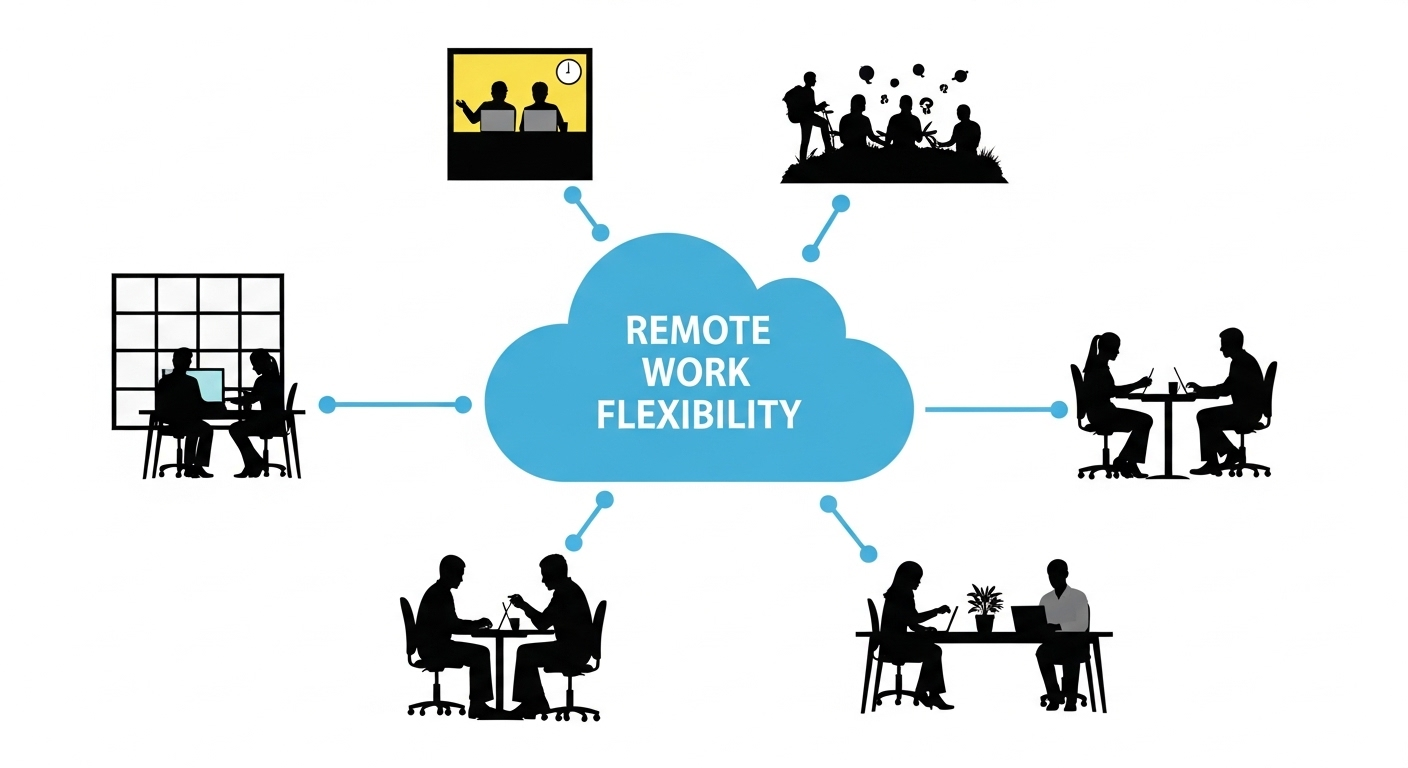
"Modern cloud VDI ecosystem illustration highlighting cost savings, security, scalability, and remote work flexibility.

Cloud VDI delivers measurable advantages compared to traditional desktops and traditional VDI infrastructure:

  • Cost Savings
  • Lower Hardware Costs:
  • Centralized Management
  • Enhanced Security
  • Flexible Remote Work
  • BYOD Support
  • Scalable Infrastructure
  • Reduced Desktop Management Complexity

Taken together, these benefits create a more agile desktop infrastructure, one that reduces operational friction while supporting modern, distributed teams.


What Are the Limitations or Trade-Offs of Cloud VDI?

While powerful, cloud VDI also comes with considerations:

  • Ongoing Subscription Fees: Monthly or annual costs can add up over time, particularly for large user bases.
  • Less Customization: Traditional VDI environments often allow deeper control over infrastructure configurations.
  • Network Dependency: A stable internet connection is essential for consistent performance.
  • Performance Risks: Limited bandwidth or high latency can affect responsiveness.
  • Graphics-Intensive Limitations: Some high-end rendering or specialized workloads may experience performance constraints depending on infrastructure design.

These trade-offs do not cancel out the benefits, but they do require thoughtful planning. Cloud VDI works best when network capacity is properly assessed, user workloads are clearly defined, and scalability is evaluated in advance.

The goal is alignment. When infrastructure, user expectations, and cost models are matched carefully, cloud VDI can deliver both efficiency and flexibility without unnecessary compromise.


What Are the Most Common Use Cases for Cloud VDI?

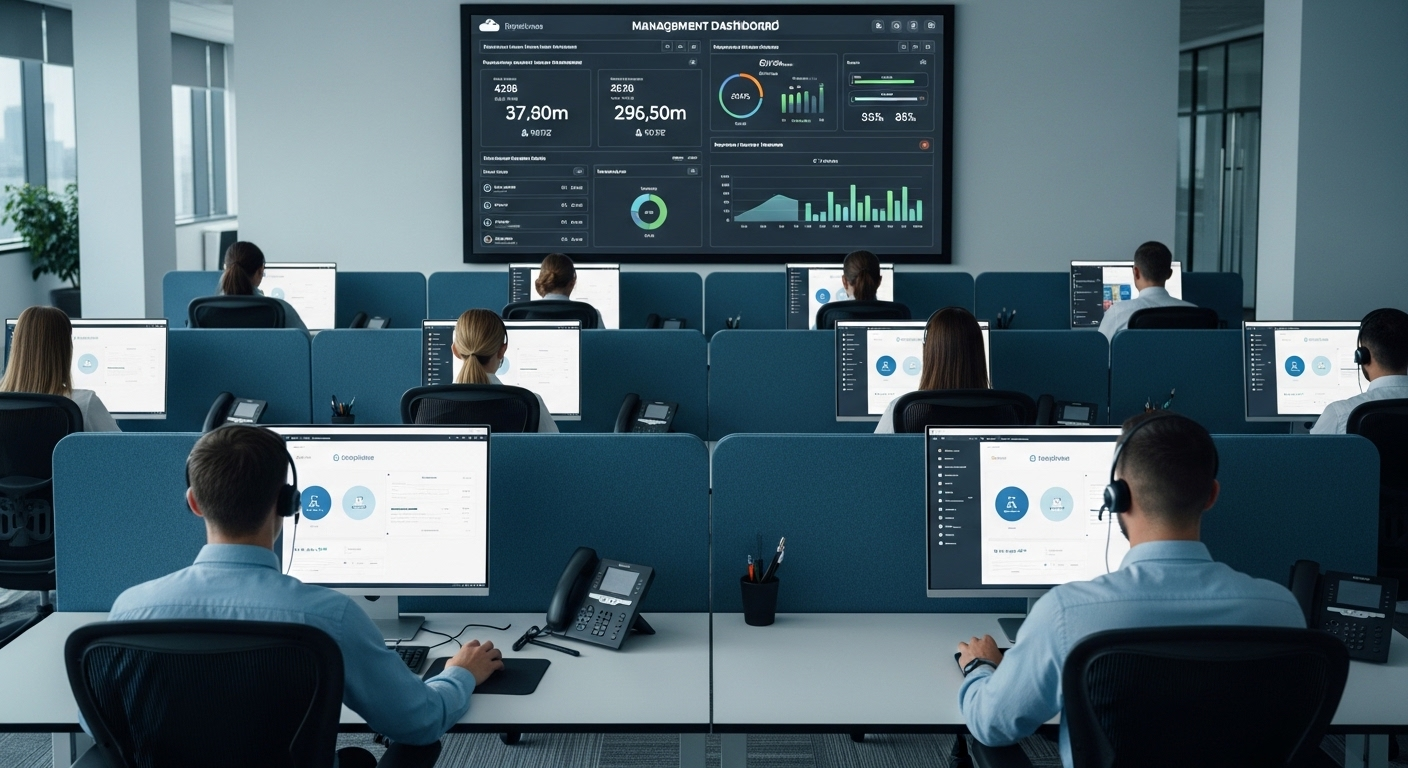
Modern call center agents using identical cloud-based virtual desktops with centralized management dashboard in the background.

Cloud VDI supports a wide range of industries and digital workspaces:

  • Remote Workforces: Provides secure remote access for geographically dispersed employees, allowing them to connect to the same desktop environment from any location with an internet connection.
  • Call Centers: Enables multiple users to access standardized virtual desktops, ensuring consistency, easier desktop management, and faster onboarding.
  • Healthcare and Finance: Supports enhanced security and compliance requirements by keeping sensitive data inside a secure cloud data center.
  • Education: Allows students to access full desktop environments, specialized applications, and lab software both on campus and remotely.
  • Manufacturing: Gives engineers and technicians secure access to Windows or Linux desktop systems without relying on physical machines on-site.
  • Software Development: Makes it possible to provision isolated virtual environments for development and testing.
  • Temporary Workers: Simplifies rapid deployment of new virtual desktops without purchasing additional hardware.


How Do You Plan and Deploy a Cloud VDI Environment Successfully?

Successful VDI deployment requires strategic planning:

  1. Map User Requirements: Identify applications, performance expectations, and whether users need a personalized desktop or standardized environment. Clear profiling prevents overprovisioning and supports smoother vdi deployment.
  2. Assess Network Infrastructure: Ensure bandwidth and latency can support remote access protocols reliably. Weak connectivity undermines even the strongest cloud infrastructure.
  3. Determine Resource Allocation: Use performance monitoring tools to define virtual machine requirements, including CPU, memory, and storage for operating system images.
  4. Conduct a Pilot Program: Roll out to a small group first. Test configuration accuracy, load balancing, and centralized management controls before scaling.
  5. Train End Users: Provide guidance on secure access, login procedures, and navigating digital workspaces. Adoption matters.
  6. Monitor and Optimize: Continuously track performance metrics and manage user access policies to maintain stability.
  7. Evaluate Scalability: Confirm that your cloud infrastructure can support growth without disruption or unnecessary cost spikes.


How Do You Choose the Right Cloud VDI Provider?

IT decision maker comparing cloud VDI providers on a large dashboard showing security, scalability, pricing, and performance metrics.

Selecting the right cloud VDI provider requires careful evaluation:

  • Security and Compliance Capabilities: Ensure the platform includes encryption, access controls, auditing, and policy enforcement to protect sensitive data stored in the cloud.
  • Ease of Desktop Management: A strong cloud VDI solution should simplify updates to operating system images, desktop provisioning, and user management through centralized tools.
  • Support for Persistent and Non-Persistent VDI: The provider should support both personalized desktop environments and scalable, standardized virtual desktops.
  • Scalability and Future Growth: Confirm the infrastructure can handle increasing users without requiring costly redesigns.
  • Transparent Pricing Model: Subscription pricing should be predictable and aligned with usage, avoiding hidden hardware costs.
  • Performance Optimization: Look for efficient remote display delivery and bandwidth management to maintain responsiveness.
  • Browser-Based Accessibility: Modern providers like Apporto deliver virtual desktops through the browser, reducing client complexity and improving secure access.
  • Centralized Management Tools: Administrators should be able to manage user access and system updates from a single, streamlined interface.


Why Modern Cloud-Native VDI Is Replacing Traditional Infrastructure

Traditional VDI infrastructure was built for a different era. It required on-premise servers, storage arrays, networking gear, and careful coordination between hypervisors and connection brokers. Managing that stack demanded time, capital, and specialized expertise. For many organizations, it became more complicated than the problem it was meant to solve.

Modern cloud-native VDI takes a lighter approach. Instead of maintaining heavy backend systems inside a corporate data center, you rely on cloud infrastructure that is centrally managed and continuously updated.

Hardware costs drop because processing happens remotely. Desktop computers and thin clients no longer need to carry the workload.

Browser-based access further simplifies the experience. You open a secure session, log in, and your virtual desktop appears. No complex client installations.

No intricate configuration of connection brokers. Platforms built around this model, such as Apporto, illustrate how cloud VDI can remain secure, scalable, and significantly easier to operate than traditional infrastructure.


Final Thoughts

At its core, cloud VDI is a virtual desktop infrastructure model where your desktop environment runs in cloud infrastructure instead of on a physical machine. You access it through the internet, while processing, storage, and security remain inside a secure data center. That design alone explains much of its appeal.

You gain flexibility for remote work, centralized desktop management, enhanced security controls, and often meaningful cost savings compared to maintaining traditional VDI infrastructure. Hardware refresh cycles slow down. User access becomes easier to manage. Scaling feels less disruptive.

Still, the right choice depends on your users, workloads, and growth plans. Take the time to evaluate your requirements carefully. If simplicity, security, and scalability matter, exploring a modern cloud VDI solution like Apporto may be a practical next step.


Frequently Asked Questions (FAQs)


1. What is cloud VDI in simple terms?

Cloud VDI is a way to run your desktop environment from cloud infrastructure instead of a physical computer. Your applications, files, and operating system live in a secure data center, and you access them through an internet connection from almost any device.

2. How is cloud VDI different from remote desktop services?

Remote desktop services typically connect you to a shared server session, while cloud VDI provides a dedicated virtual desktop environment running inside its own virtual machine. Cloud VDI offers greater isolation, stronger centralized management, and more flexibility for scaling users.

3. Is cloud VDI secure for sensitive data?

Cloud VDI can be highly secure when properly configured. Data remains stored inside the cloud data center rather than on local machines, and providers implement encryption, access controls, auditing, and user provisioning to protect sensitive information and enforce compliance policies.

4. Can cloud VDI support multiple users at once?

Yes, cloud VDI is designed to support multiple users simultaneously. Virtual machines are provisioned based on demand, and centralized infrastructure allows administrators to allocate resources efficiently while maintaining performance and secure access for each user session.

5. What devices can access a cloud VDI environment?

You can access a cloud VDI environment from laptops, desktop computers, thin clients, tablets, and even personal devices. As long as there is a stable internet connection and secure authentication, the virtual desktop environment remains accessible and consistent.

VDI vs VPN vs DaaS: What Is Your Best Solution for Remote Work?

vdi vs vpn vs daas desktops laptops

VDI vs VPN vs DaaS: What Is Your Best Solution for Remote Work?

In recent years, remote work has become the norm rather than the exception. The rise of distributed teams and the increasing need for flexibility has led to the development of various remote work solutions. However, with so many different options available, it can be challenging to decide which solution is best for your business. In this article, we’ll compare three of the most popular solutions for remote work: Virtual Desktop Infrastructure (VDI), Virtual Private Network (VPN), and Desktop as a Service (DaaS).

Understanding Remote Work Solutions

Before we dive into the specifics of each solution, let’s take a moment to understand the concept of remote work solutions. Remote work solutions are tools that allow employees to access their work environment and data from any location. In other words, it’s a way for employees to work from home or other remote locations while maintaining the same level of productivity as they would in the office.

The Rise of Remote Work

The rise of remote work can be attributed to various factors such as technological advancements, changing work culture, and the need for work-life balance. According to a report by FlexJobs, the number of people working remotely in the United States has increased by 159% since 2005.

One of the main reasons for the rise of remote work is the advancement of technology. With the internet and various communication tools, it’s easier than ever for employees to work from anywhere in the world. This has opened up new opportunities for businesses to hire talented individuals from different parts of the world, regardless of their location.

Another factor contributing to the growth of remote work is the changing work culture. Many employees are looking for more flexibility in their work schedule and the ability to work from home. This is especially true for working parents who need to balance work and family responsibilities.

Finally, the need for work-life balance has become increasingly important in today’s society. With remote work, employees can eliminate the time and stress of commuting to and from work, which can lead to a better work-life balance.

The Need for Secure and Efficient Solutions

With remote work becoming more prevalent, businesses need to ensure that their employees’ work environments are secure and efficient. This is where remote work solutions come in. These tools provide employees with secure access to their work environment while ensuring that data remains protected.

One of the main concerns of remote work is security. With employees accessing company data from remote locations, there is a risk of data breaches and cyber attacks. Remote work solutions provide businesses with the tools they need to ensure that their data is secure and protected from potential threats.

In addition to security, remote work solutions also provide businesses with the tools they need to ensure that their employees are productive and efficient. These tools can include project management software, time tracking tools, and communication tools.

Overall, remote work solutions have become an essential part of modern business. They provide employees with the flexibility they need to work from anywhere while ensuring that businesses remain productive and secure.

Virtual Desktop Infrastructure (VDI)

Virtual Desktop Infrastructure (VDI) is a technology that allows users to access a virtual desktop that is hosted on a centralized server. VDI provides a secure and flexible way for employees to work remotely from anywhere with an internet connection.

VDI is a type of desktop virtualization that enables users to access a centralized desktop environment hosted on a server. Instead of accessing their desktop locally on their device, users connect to a virtual machine (VM) that contains their desktop environment, applications, and data.

One of the advantages of VDI is enhanced security. Since the virtual desktop is hosted on a centralized server, it is easier to manage and secure than individual devices. Additionally, VDI allows for centralized management, which can simplify the process of deploying and updating applications and operating systems.

Another benefit of VDI is improved scalability. Since the virtual desktop environment is hosted on a server, it can be scaled up or down to meet the needs of the organization. This makes it an ideal solution for organizations that experience fluctuations in demand or have a rapidly growing workforce.

However, there are also some downsides to VDI. One of the most significant drawbacks is the cost. Implementing and maintaining a VDI infrastructure can be expensive, and it requires specialized hardware and software. Additionally, VDI requires a reliable and high-speed internet connection, which may not be available in all locations.

Despite the costs and challenges, VDI has several use cases in various industries. For example, VDI is an excellent solution for organizations that require high-security standards, such as the healthcare industry or financial institutions. VDI can help ensure that sensitive data is stored and accessed securely.

VDI is also an ideal solution for organizations with a highly mobile workforce, such as consulting firms or sales teams. With VDI, employees can access their virtual desktop from any device with an internet connection, making it easier to work remotely or on the go.

In conclusion, VDI is a powerful technology that can provide many benefits to organizations. While it may not be the right solution for every organization, it is worth considering for those that require enhanced security, centralized management, and improved scalability.

Virtual Desktop Provider Comparison

See how Apporto stacks up against the most popular virtualization technologies available today

Virtual Private Network (VPN)

VPN is a technology that allows users to connect to a private network securely over the internet. A VPN creates an encrypted tunnel between the user’s device and the private network, ensuring that any data transmitted is secure.

With the increasing number of cyberattacks and data breaches, VPN has become an essential tool for businesses and individuals to protect their sensitive information. VPN is also used by individuals who want to access content that may be restricted in their region, such as streaming services or social media platforms.

What is VPN?

A VPN is a secure connection between a user’s device and a private network, such as a corporate network. When a user connects to a VPN, their device sends data through an encrypted tunnel to the private network, ensuring that any data transmitted is secure.

The encryption used by VPN ensures that any data transmitted between the user’s device and the private network cannot be intercepted or read by unauthorized parties. This is especially important for businesses that deal with sensitive information, such as financial data or personal information of their customers.

Pros and Cons of VPN

VPN has several advantages, including enhanced security, easy accessibility, and cost-effectiveness. By using a VPN, businesses can ensure that their employees can securely access the corporate network from any location, without the need for expensive hardware or software.

However, VPN can be slower than other remote work solutions, and it requires users to have reliable internet connectivity. In addition, some VPN providers may keep logs of user activity, which can be a concern for individuals who value their privacy. Another major concern with VPN is that it does not provide any security over the endpoint device. A compromised endpoint can easily extend into the network and beyond.

Use Cases for VPN

VPN is an excellent solution for any business that requires employees to access the corporate network from remote locations. VPN is also ideal for organizations with a distributed workforce or teams that travel frequently.

Individuals can also benefit from using VPN, especially when accessing public Wi-Fi networks. Public Wi-Fi networks are often unsecured, which means that any data transmitted over these networks can be intercepted by hackers. By using a VPN, individuals can ensure that their data is encrypted and secure, even when using public Wi-Fi networks.

In summary, VPN is a powerful tool that provides enhanced security and accessibility for businesses and individuals. By using VPN, users can ensure that their data is encrypted and secure, even when accessing the internet from remote locations or public Wi-Fi networks.

Desktop as a Service (DaaS)

DaaS is a cloud computing solution that enables users to access their desktop environment from anywhere with an internet connection. The virtual desktop is hosted in the cloud, and users access it through a web browser or a dedicated client application.

What is DaaS?

DaaS is a cloud-based service that provides users with a virtual desktop environment that can be accessed from anywhere with an internet connection. The virtual desktop environment is hosted in the cloud rather than on the user’s device.

One of the benefits of DaaS is that it allows users to access their desktop environment from any device, including laptops, tablets, and smartphones. This means that users can work from anywhere, at any time, without being tied to a specific device or location.

Another advantage of DaaS is that it is highly scalable. As the needs of the business grow, additional virtual desktops can be added to the cloud environment without the need for additional hardware or software. This makes DaaS a cost-effective solution for businesses of all sizes.

Pros and Cons of DaaS

DaaS has many advantages, including scalability, cost-effectiveness, and accessibility. However, DaaS requires a reliable and high-speed internet connection, and some users may experience latency or performance issues.

One of the main benefits of DaaS is that it eliminates the need for businesses to manage and maintain their own physical desktop infrastructure. This can save businesses time and money, as they no longer need to worry about hardware upgrades, software updates, or security patches.

DaaS is quickly becoming the preferred solution for many with advantages over VDI and VPN when all factors are considered; Cost, security, scalability, performance, and end-user experience.

Use Cases for DaaS

DaaS is an excellent solution for businesses that require flexibility and scalability. DaaS is an ideal solution for organizations with a highly mobile workforce, such as consulting firms or sales teams.

Another use case for DaaS is for businesses that require a high level of security. Because the virtual desktop environment is hosted in the cloud, it can be more easily secured and monitored than a traditional desktop environment.

Finally, DaaS is a great solution for businesses that need to quickly provision new desktop environments. Because the virtual desktop environment is hosted in the cloud, new desktop environments can be created and deployed in a matter of minutes, rather than days or weeks.

In conclusion, DaaS is an innovative solution that offers businesses a flexible, scalable, and cost-effective way to provide their employees with a virtual desktop environment. While there are some potential drawbacks to DaaS, the benefits far outweigh the risks for many businesses.

Conclusion

VDI, VPN, and DaaS are three of the most popular remote work solutions, each with its own set of advantages and disadvantages. When deciding which solution is best for your business, consider factors such as security, cost, accessibility, and scalability to determine which solution will meet your specific needs. By selecting the right remote work solution, you can ensure that your employees can work productively from anywhere, while maintaining the same level of security and efficiency as they would in the office.

Deliver secure BYOD with Cloud Desktops

BYOD Cloud desktops

The Bring Your Own Device (BYOD) trend has gained significant momentum among businesses looking to boost employee productivity and streamline workflows. The ability for employees to work with their own devices, such as laptops, smartphones, and tablets, can significantly reduce overhead costs for the organization. While the BYOD trend offers numerous benefits, it also poses a significant security risk to enterprise IT operations. Cloud desktops have emerged as a feasible solution for IT teams looking to mitigate risk and enhance security for BYOD environments.

Mitigating Risk and Enhancing Security for BYOD with Cloud Desktops

In today’s business environment, Bring Your Own Device (BYOD) has become increasingly popular, allowing employees to use their personal devices to access company data and applications. While this trend can increase productivity and flexibility, it also creates security challenges. Business data and applications are accessible through unsecured devices, increasing the risk of data breaches and cyberattacks. To mitigate this risk, IT teams deploy security measures such as firewalls and antivirus software. However, this is often not enough to fully protect against sophisticated threats.

Cloud desktops provide added security in such environments by centralizing data storage and enhancing the overall security posture of the organization. By hosting user workspaces in a secure data center rather than on the user’s device, cloud desktops reduce the risk of unauthorized access to sensitive data and applications. Users can access their desktops and applications from any device through a secure connection such as a Virtual Private Network (VPN) or HTTPS.

Cloud desktops also offer advanced security features such as multi-factor authentication to ensure that only authorized users can access sensitive information. This is particularly important in a BYOD environment, where devices may be lost or stolen, and passwords can be easily compromised. With multi-factor authentication, users are required to provide two or more forms of identification, such as a password and a fingerprint, before they can access their desktops and applications.

Another benefit of cloud desktops is that they can be easily managed and updated by the IT team. This ensures that all devices are running the latest software and security patches, reducing the risk of vulnerabilities that can be exploited by cybercriminals. Additionally, cloud desktops can be configured to automatically encrypt data, further enhancing security.

Finally, cloud desktops provide a secure and reliable backup solution for business data. In the event of a device failure or data loss, all data is securely stored in the cloud and can be easily restored to a new device. This ensures that business operations can continue uninterrupted, even in the face of unexpected events.

In conclusion, cloud desktops provide a secure and efficient solution for businesses looking to mitigate the risks associated with BYOD. By centralizing data storage, enhancing security features, and providing reliable backup solutions, cloud desktops offer peace of mind for both IT teams and employees.

The Benefits of BYOD and Cloud Desktops

Bring Your Own Device (BYOD) policies have become increasingly popular in recent years, and for good reason. With BYOD, employees are able to work from anywhere and at any time using their own devices. This means that they can work from home, on the go, or even while traveling. This level of flexibility leads to increased productivity and work satisfaction, as employees are able to work in an environment that suits them best.

But BYOD isn’t just beneficial for employees. IT teams can also benefit from this approach by leveraging cloud desktops to enhance the user experience and provide a consistent environment across different devices and platforms. With cloud desktops, users can access the same desktop and applications from any device, eliminating the need to install and configure software on each device. This leads to reduced IT support costs and increased efficiency, as the IT team no longer needs to spend time installing and configuring software on each individual device.

Cloud desktops also provide the IT team with a central management console to monitor and manage user workspaces. This means that they can easily manage user access, monitor usage, and troubleshoot any issues that arise. With a central management console, the IT team can ensure that all user workspaces are up-to-date and secure, which is especially important in today’s world of remote work and cyber threats.

Another benefit of BYOD and cloud desktops is that they allow for greater collaboration among employees. With the ability to access the same desktop and applications from any device, employees can easily share files and work together on projects, regardless of their location. This level of collaboration can lead to increased innovation and productivity, as employees are able to work together in real-time, even if they are miles apart.

Overall, the benefits of BYOD and cloud desktops are clear. From increased productivity and work satisfaction to reduced IT support costs and greater collaboration, these approaches can help organizations stay competitive in today’s fast-paced and ever-changing business environment.

Zero Trust Virtual Desktop White Paper

In this white paper, you will learn how Apporto helps companies achieve highly secure remote workplaces

How BYOD can actually increase endpoint security

Bring Your Own Device (BYOD) is a growing trend in the workplace, where employees use their own devices to access company data and applications. While BYOD has been known to increase the risk of data breaches, it can also improve endpoint security in a number of ways.

One of the main advantages of BYOD is that employees using their own devices are more likely to ensure that their devices are up to date with the latest security updates and patches. This is because they have a personal investment in keeping their devices secure, as they are used for both personal and professional purposes. As a result, employees are more likely to take responsibility for the security of their devices and follow best practices to keep them secure.

Additionally, BYOD can lead to better adherence to security policies and practices. When employees are allowed to use their own devices, they are more likely to be invested in the security of those devices. This means that they are more likely to follow security policies and guidelines, such as using strong passwords, enabling two-factor authentication, and avoiding risky behaviors like clicking on suspicious links or opening attachments from unknown senders.

IT teams can leverage these advantages by providing secure BYOD policies and guidelines to ensure that employees are aware of their responsibilities in protecting company data. This can include guidelines for securing devices, such as requiring the use of anti-virus software, enforcing encryption, and limiting the installation of third-party apps. It can also include guidelines for safe data handling, such as avoiding public Wi-Fi networks and using secure file transfer protocols.

While BYOD can offer numerous benefits to businesses, it also poses a significant security risk. This is where cloud desktops can provide a feasible solution to mitigate this risk and enhance the overall security posture of the organization. With cloud desktops, IT teams can provide a consistent user experience and centrally manage user workspaces, leading to increased efficiency and reduced costs.

Cloud desktops also offer a secure environment for accessing company data and applications. By keeping data and applications in the cloud, businesses can reduce the risk of data breaches and ensure that sensitive data is not stored on employee devices. This can be particularly important in industries that handle sensitive data, such as healthcare, finance, and government.

In conclusion, BYOD can actually increase endpoint security if managed effectively. By implementing secure BYOD policies and leveraging cloud desktops, businesses can embrace the benefits of BYOD while protecting their sensitive data and applications. With the right policies and tools in place, BYOD can be a win-win for both employees and businesses.

Cyber security: How higher ed aim to meet the rising demand

Cybersecurity is becoming an increasingly crucial field as the world becomes more digital. With the rise in cyber threats, the need for skilled cybersecurity experts is growing. In response, higher education institutions are taking steps to prepare students for this in-demand field.

The growing need for cybersecurity professionals

The number of cyber threats continues to increase at an alarming rate, making cybersecurity a top priority for organizations across all industries. From data breaches to network attacks, the potential for damage is significant. As more businesses store sensitive data digitally, cybersecurity has become necessary to protect that data.

The increasing number of cyber threats

Cyber threats include attacks on telecommunications and network infrastructure, malware aimed at stealing data, and more. Hackers are becoming more sophisticated, leaving organizations vulnerable to attack. The need for skilled cybersecurity professionals is essential to protect against these threats.

One of the most significant threats to cybersecurity is ransomware. Ransomware is a type of malware that encrypts an organization’s data, making it inaccessible until a ransom is paid. The cost of ransomware attacks can be significant, with some organizations paying millions of dollars to regain access to their data.

Another growing threat is phishing attacks. Phishing attacks involve sending fraudulent emails that appear to be from a legitimate source, such as a bank or a company. The goal of these attacks is to trick individuals into providing sensitive information, such as login credentials or credit card numbers. Skilled cybersecurity professionals can help organizations identify and prevent these types of attacks.

The expanding digital landscape

As the world becomes more connected, the digital landscape is expanding. This includes the internet of things (IoT), which means that more devices than ever are connected to the internet. With more devices being used to store sensitive data, from smartphones to smart homes, cybersecurity is essential to protect against attacks.

One of the challenges of securing IoT devices is that they often have limited processing power and memory. This means that traditional security measures, such as antivirus software, may not be effective. Skilled cybersecurity professionals can help organizations develop new strategies for securing IoT devices.

The demand for skilled cybersecurity experts

The demand for skilled cybersecurity experts is growing as the number of cyber threats continues to rise. According to the Bureau of Labor Statistics, the employment of information security analysts is projected to grow 31% from 2019 to 2029, which is much faster than the average for all occupations.

One reason for the high demand for cybersecurity professionals is the shortage of qualified candidates. Many organizations struggle to find individuals with the necessary skills and experience to fill cybersecurity roles. This shortage is expected to continue in the coming years, making cybersecurity an attractive career choice for those interested in technology.

In addition to technical skills, cybersecurity professionals must also have strong communication and problem-solving skills. They must be able to communicate complex technical information to non-technical stakeholders and work collaboratively with other departments within an organization.

Overall, the growing need for cybersecurity professionals is a reflection of the increasing importance of protecting sensitive data in today’s digital landscape. Skilled cybersecurity professionals play a critical role in safeguarding organizations against cyber threats and ensuring the security of sensitive information.

Higher education’s response to the cybersecurity challenge

As technology continues to advance, so do the threats to cybersecurity. With the rise of cyberattacks and data breaches, the demand for cybersecurity professionals has never been higher. Higher education institutions are taking notice and are actively working to meet this demand by creating specialized programs, partnering with industry leaders, and integrating cybersecurity into existing curriculums.

Developing specialized cybersecurity programs

Many higher education institutions understand the importance of cybersecurity and are developing specialized programs to prepare students for this in-demand field. These programs provide students with the necessary skills and knowledge to work in cybersecurity, including technical skills like ethical hacking and network security, as well as soft skills like communication and teamwork.

For example, the University of Texas at San Antonio offers a Bachelor of Business Administration in Cybersecurity, which combines business principles with cybersecurity knowledge. The program prepares students for careers in areas such as cybersecurity management and risk analysis.

Partnering with industry leaders

Higher education institutions are also partnering with industry leaders to provide students with real-world experience and networking opportunities. These partnerships allow students to gain insight into the industry and learn from experienced professionals. They also provide opportunities for internships, co-ops, and job placements after graduation.

One example of such a partnership is the Cybersecurity Apprenticeship Program between Northern Virginia Community College and Amazon Web Services. The program provides students with hands-on experience working with AWS security tools and the opportunity to earn industry-recognized certifications.

Integrating cybersecurity into existing curriculums

Higher education institutions are also integrating cybersecurity into existing curriculums to prepare students for the digital age. This includes incorporating cybersecurity into computer science and information technology programs, as well as business and law programs. By doing so, students are better equipped to recognize cyber threats and protect against them.

For example, the University of Maryland offers a Cybersecurity Law Program, which provides law students with a comprehensive understanding of cybersecurity law and policy. The program prepares students for careers in areas such as cybersecurity compliance and risk management.

Encouraging interdisciplinary collaboration

Cybersecurity is an interdisciplinary field that requires collaboration across different areas of study. Higher education institutions are encouraging interdisciplinary collaboration by providing opportunities for students to work together on cybersecurity projects from different fields of study.

For example, the University of California, Berkeley offers a Cybersecurity Master’s Program that brings together students from computer science, law, public policy, and business. The program provides students with a broad understanding of cybersecurity issues and prepares them for careers in areas such as cybersecurity consulting and policy-making.

As the demand for cybersecurity professionals continues to rise, higher education institutions are taking steps to meet this challenge. By developing specialized programs, partnering with industry leaders, integrating cybersecurity into existing curriculums, and encouraging interdisciplinary collaboration, higher education institutions are preparing students for successful careers in the cybersecurity field.

Preparing students for the cybersecurity workforce

As technology continues to advance, the need for cybersecurity professionals grows. Higher education institutions are taking steps to prepare students for the cybersecurity workforce through hands-on learning experiences, internships and co-op opportunities, networking, and professional certifications and credentials.

Hands-on learning experiences

Many higher education institutions are providing students with hands-on experience in cybersecurity through lab courses and simulations. These experiences allow students to learn by doing, building practical skills in a safe and controlled environment. For example, students may learn how to identify and mitigate cyber attacks, as well as how to secure networks and data from potential threats.

Students can also participate in cybersecurity competitions, such as the National Cyber League, which allows them to apply their skills in a competitive setting and gain recognition for their abilities.

Internships and co-op opportunities

Internships and co-op opportunities allow students to gain real-world experience in cybersecurity, while also networking with industry professionals. These opportunities can lead to job placements after graduation and help students become more competitive in the job market.

Some institutions partner with local businesses and organizations to offer internships and co-op opportunities to their students. This allows students to work on real-world projects and gain experience in a variety of cybersecurity roles, such as security analyst, network engineer, and information security officer.

Networking and mentorship opportunities

Networking and mentorship opportunities provide students with the resources to build a professional network and receive guidance from experienced professionals. This includes attending industry conferences and events, as well as connecting with alumni and industry leaders.

Students can also join cybersecurity clubs and organizations on campus, which provide opportunities to meet like-minded individuals and learn from guest speakers and industry professionals.

Professional certifications and credentials

Professional certifications and credentials, such as the Certified Information Systems Security Professional (CISSP) and the CompTIA Security+ certification, can help students stand out to potential employers. These certifications demonstrate a commitment to the field and provide proof of skills and knowledge.

Some institutions offer certification preparation courses to help students prepare for these exams. Additionally, students may have the opportunity to take these exams on campus, making it easier and more convenient to obtain these credentials.

In conclusion, higher education institutions are taking proactive steps to prepare students for the cybersecurity workforce. Through hands-on learning experiences, internships and co-op opportunities, networking, and professional certifications and credentials, students are gaining the skills and knowledge needed to succeed in this rapidly growing field.

Addressing the diversity gap in cybersecurity

Diversity is not only a buzzword, it is an important issue across all industries, including cybersecurity. Cybersecurity is a field that demands a diverse range of skills and perspectives, yet women and people of color are still underrepresented in this field.

Higher education institutions are taking steps to encourage underrepresented groups to pursue cybersecurity careers and to create inclusive learning environments that support all students.

Encouraging underrepresented groups to pursue cybersecurity careers

There are many reasons why women and people of color are underrepresented in the cybersecurity field. One of the main reasons is a lack of exposure to the field and role models who look like them. Higher education institutions are working to change this by providing scholarships, mentorship opportunities, and diversity and inclusion initiatives.

For example, some universities are partnering with industry leaders to create mentorship programs that connect students with professionals in the field. These programs not only provide students with valuable networking opportunities, but they also help to demystify the cybersecurity field and show students that they too can succeed in this industry.

Scholarships and financial support for diverse students

Higher education institutions are also providing scholarships and financial support to diverse students to help them pursue cybersecurity careers. This includes programs that provide funding for education and cybersecurity training.

For example, some universities are offering scholarships specifically for women and people of color who are interested in pursuing cybersecurity careers. These scholarships not only provide financial support, but they also send a message that these groups are valued and welcome in the cybersecurity field.

Building inclusive learning environments

Creating an inclusive learning environment is critical to supporting all students, including those from underrepresented groups. Higher education institutions are creating inclusive learning environments by implementing policies and initiatives that support all students.

For example, some universities are creating safe spaces for underrepresented groups where they can connect with peers who share similar experiences. These safe spaces not only provide a sense of community, but they also provide a supportive environment where students can share their experiences and learn from one another.

Additionally, universities are promoting diversity and inclusion in the curriculum by incorporating diverse perspectives and experiences into coursework. This not only helps to broaden students’ perspectives, but it also helps to prepare them for the diverse workforce they will encounter after graduation.

Finally, universities are providing resources to support student mental health and wellbeing. This includes counseling services, wellness programs, and other resources that help students to manage stress and maintain their mental health.

In conclusion, addressing the diversity gap in cybersecurity is critical to creating a more inclusive and effective workforce. Higher education institutions are taking important steps to encourage underrepresented groups to pursue cybersecurity careers and to create inclusive learning environments that support all students.

Conclusion

The demand for cybersecurity professionals is growing as the digital landscape continues to expand, and cyber threats become more sophisticated. Higher education institutions are taking steps to prepare students for this in-demand field by creating specialized programs, partnering with industry leaders, and integrating cybersecurity into curriculums. They are also providing hands-on learning experiences, internships and co-op opportunities, networking, and professional certifications and credentials. By addressing the diversity gap and creating inclusive learning environments, higher education institutions are ensuring that all students have the opportunity to pursue cybersecurity careers.