

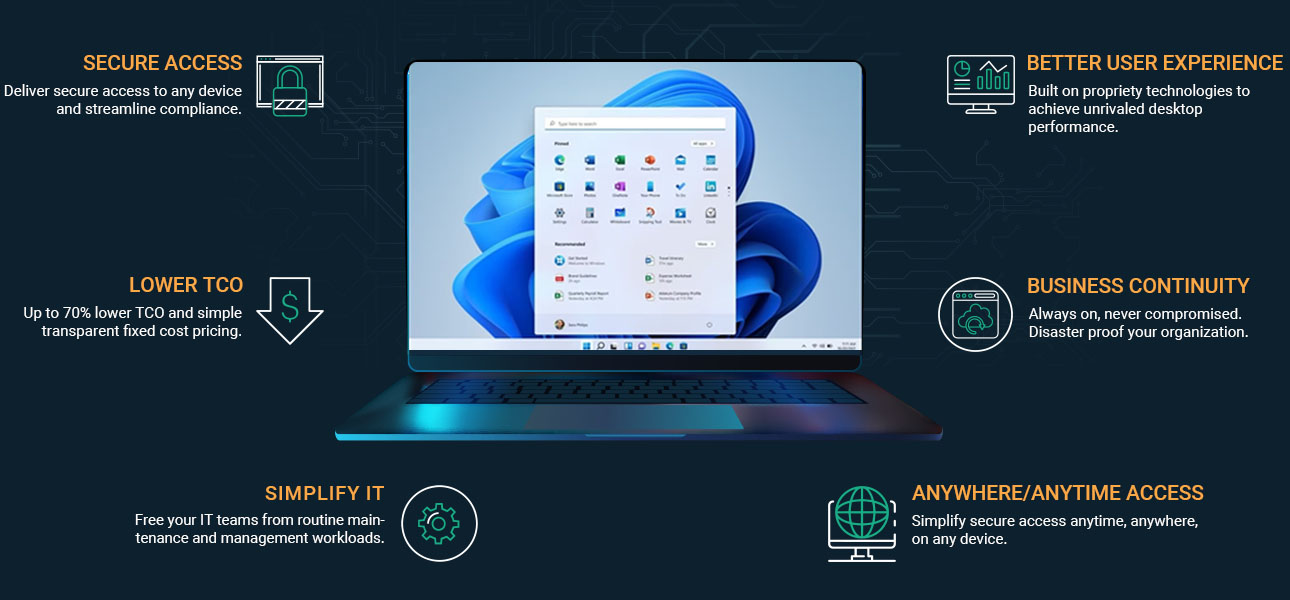
Desktop as a Service, often shortened to DaaS, is a cloud computing offering that delivers fully managed virtual desktops over the internet. Instead of relying on physical machines tied to a single office, you access cloud desktops hosted in secure data centers. Your desktop environment, applications, and data are streamed to your device wherever you are.
The rise of remote work, hybrid teams, and mobile workers has exposed the limits of traditional desktop infrastructure. Physical desktops are expensive to maintain, difficult to scale quickly, and vulnerable to device loss or hardware failure. Expanding capacity often means buying more equipment, configuring new systems, and increasing infrastructure management overhead.
DaaS shifts that model. It offers flexibility, predictable cost efficiency, and centralized control. But it also introduces new considerations, from security architecture to vendor lock-in risks.
In this blog, you will learn how DaaS works, how it compares to virtual desktop infrastructure, what security controls it provides, what trade-offs exist, and how to choose the right provider for your organization.
What Is Desktop as a Service (DaaS) in Simple Terms?
Desktop as a Service is a model where your desktop environment lives in the cloud instead of on a physical computer sitting under your desk. Rather than storing applications, files, and operating systems on local physical hardware, those resources run inside secure data centers. You connect to them over the internet. That is the core idea.
Virtual desktops hosted in cloud infrastructure allow users access to their workspace from almost any device. Laptop. Tablet. Mobile device. Even a thin client with minimal local processing power. The computing happens elsewhere, inside powerful servers managed by a service provider.
Contrast that with the traditional desktop model. In that setup, every employee relies on a physical machine that must be purchased, configured, maintained, patched, and eventually replaced. Data often resides on the device itself, which increases the risk of loss or theft. Scaling means buying more machines. Managing them means touching each one.
With service DaaS, centralized data storage keeps business information inside controlled environments. Users access their desktop environment through a web browser or secure client, connecting through a secure access point. IT administrators manage virtual desktops from a centralized management console, reducing the burden of hands-on maintenance.
Some core elements of DaaS are:
- Virtual desktops hosted in secure data centers
- Delivered through cloud providers
- Accessible from own devices or mobile device
- Managed desktop via centralized management console
- Eliminates need for physical hardware
How Does DaaS Actually Work?

Under the surface, DaaS relies on virtualization technology. That phrase can sound abstract, but the idea is fairly grounded. The desktop environment is separated from the physical computer. Your screen, applications, and files are no longer tied to the device in front of you. They exist inside virtual machines running in high-availability cloud data centers operated by a service provider.
Think of it as hosting desktops remotely. The backend virtual desktop infrastructure lives in powerful servers, often distributed across multiple geographic regions for redundancy. When users access their workspace, they are connecting to a virtual machine that mirrors a full operating system. The heavy lifting happens in the data center, not on the local device.
Desktop images are provisioned quickly, sometimes in minutes. IT administrators can deploy standardized environments or customize them for different departments. Persistent desktop models save user changes, settings, and installed applications across sessions. Non-persistent desktop models reset to a clean image each time a user logs out, which strengthens security and simplifies management.
Cloud based virtual desktops are streamed to the user’s device through secure protocols such as Microsoft RDP or Citrix HDX. You do not see the complexity. You simply see your desktop appear.
Authentication plays a central role. Secure access often requires multi factor authentication, meaning more than just a password. Data encryption protects information both in transit and at rest. That means your data is encrypted while moving across the internet and while stored inside the cloud environment.
Centralized desktop management allows IT administrators to enforce policies at scale. Security patches, access controls, and configuration updates can be applied across hundreds or thousands of virtual machines without touching individual endpoints.
Behind the scenes, it is coordinated. Structured. Automated in many ways. And when designed properly, it feels almost invisible to the end user.
How Is DaaS Different from Virtual Desktop Infrastructure (VDI)?
Desktop as a Service and virtual desktop infrastructure appear nearly identical. Both separate the desktop environment from the physical device. Both rely on virtualization. The distinction lies in who carries the weight.
With traditional virtual desktop infrastructure, the organization typically owns and manages the backend systems. The servers often live in an on-premises data center or within a private cloud. IT teams handle infrastructure management, security updates, hardware refresh cycles, and performance tuning. You gain deeper control. You also inherit complexity.
DaaS changes that equation. Instead of maintaining the virtualization stack yourself, a cloud provider hosts and operates the environment. The provider handles hardware, networking, storage, and most operational maintenance. Your team focuses on access policies and user management rather than server upkeep.
Scalability illustrates the difference clearly. In a VDI deployment, expanding capacity may require purchasing additional hardware, configuring new systems, and waiting for installation. DaaS allows rapid, elastic scaling because cloud resources can be provisioned quickly. That agility can translate into cost savings, particularly for seasonal or growing organizations.
The cost model diverges as well. VDI often demands significant capital expense upfront. DaaS typically operates on a subscription basis, shifting spending into predictable operational costs.
There are trade-offs. VDI may provide more granular access control and deeper customization. DaaS prioritizes flexibility and faster deployment. Vendor lock in can be a consideration in both models, though migration from a DaaS platform can introduce additional complexity.
The choice is less about superiority and more about alignment with your infrastructure goals.
| Feature | DaaS | Traditional VDI |
|---|---|---|
| Infrastructure Ownership | Third-party provider | In-house IT |
| Capital Expense | Low upfront | High upfront |
| Scalability | Rapid, elastic | Hardware dependent |
| Infrastructure Management | Provider handles | IT teams manage |
| Setup Speed | Fast | Slower |
| Control Level | Moderate | High |
What Are the Core Benefits of DaaS for Modern Organizations?

Once you understand how DaaS works and how it differs from traditional VDI, the practical advantages begin to surface.
Cost efficiency often tops the list. Instead of large upfront investments in servers, storage, and physical desktops, you operate on predictable subscription pricing. That model reduces capital expenses and converts infrastructure spending into manageable operational costs. For many organizations, that financial flexibility matters as much as the technology itself.
Instant desktop provisioning changes how quickly you can respond to business needs. New employees can receive desktop access within minutes rather than days. During mergers, seasonal hiring, or project-based expansions, scaling becomes less disruptive. You simply allocate additional resources inside the platform.
Remote teams and hybrid workforce models benefit directly from cloud-hosted desktop access. Employees can securely access company resources from home, while traveling, or across regional offices. Centralized management allows IT teams to deploy updates and security patches consistently, reducing vulnerabilities tied to unmanaged endpoints.
Business continuity and disaster recovery readiness are equally important. If a physical office closes or hardware fails, work does not stop. Virtual desktops remain available through secure access points, preserving operations.
BYOD policies become easier to implement because sensitive data stays inside centralized data storage. Information does not reside permanently on personal devices, lowering the risk of endpoint data loss. Access to specialized software can also be provided without installing heavy applications locally.
Why Businesses Choose DaaS Solutions
- Pay-as-you-go subscription model
- Rapid desktop access for temporary staff
- Centralized data storage for enhanced security
- Simplified desktop management for IT teams
- Support for multiple operating systems
- Secure access point for remote users
How Secure Is DaaS for Sensitive Data and Regulated Industries?
Security is usually the first serious question, especially in healthcare, finance, or education where sensitive information is tightly regulated. DaaS platforms are built with data security as a foundational layer, not an afterthought.
Data encryption standards protect information both in transit and at rest. When users connect to their cloud desktops, traffic is encrypted while traveling across the internet. Once stored inside the environment, business data remains encrypted within secure cloud or private cloud infrastructure. That reduces exposure if devices are lost or stolen.
Multi-factor authentication strengthens secure access. Instead of relying only on passwords, users verify their identity through additional factors. Combined with structured access management and role-based access control, organizations can limit who sees what. Granular access controls prevent unnecessary exposure to sensitive information.
Centralized auditing and logging provide visibility. IT administrators can monitor activity, enforce policies, and generate compliance reports. For organizations operating under HIPAA, GDPR, or financial regulations, that oversight is essential.
Another advantage is architectural. Because data is stored off physical devices, the risk associated with endpoint theft decreases. Even if a laptop disappears, company records remain protected inside the centralized environment.
Security Controls in Modern DaaS Platforms are
- Data encryption at rest and in transit
- Multi-factor authentication enforcement
- Centralized auditing and reporting
- Controlled access to sensitive information
- Regular security updates and patches
In regulated industries, enhanced security is not optional. DaaS offers structured controls that align well with strict compliance demands.
What Are the Risks or Challenges of DaaS?

DaaS is not frictionless. It introduces its own constraints, and ignoring them can create problems down the line. The most obvious dependency is internet connectivity. Cloud desktops rely on a stable, fast connection.
If bandwidth is insufficient, performance suffers. Lag becomes noticeable. Video calls stutter. Applications feel less responsive. Offline access is limited, since the desktop environment is hosted remotely. When the connection drops, productivity may pause with it.
Recurring subscription fees also require careful analysis. Over time, monthly costs can accumulate and potentially rival the expense of owning on-prem infrastructure. Cost efficiency depends on usage patterns, workforce size, and long-term planning.
Vendor lock in presents another concern. Migrating between DaaS providers can be complex, especially when desktop images, policies, and integrations are deeply embedded. Integration challenges with legacy systems may require additional configuration or specialized expertise.
Data residency rules can also influence deployment decisions, particularly in regulated industries. Governance frameworks must be clearly defined to manage access, compliance, and auditing responsibilities.
Poor implementation compounds these risks. Without thoughtful design, user experience may feel inferior to working on a well-configured physical machine.
Common Drawbacks to Consider
- Requires strong internet connection
- Recurring operational expenses
- Switching providers can be complex
- May require integration planning
- Performance tied to cloud infrastructure quality
Who Should Consider Using DaaS?
DaaS is not reserved for one industry or one type of organization. Its appeal cuts across sectors where flexibility and control must coexist. Higher education institutions often adopt cloud desktops to deliver virtual learning environments.
Students and faculty can access specialized software from anywhere, without campus labs dictating availability. IT administrators maintain centralized management, reducing the burden of maintaining hundreds of physical machines scattered across buildings.
Healthcare organizations use DaaS to ensure secure remote access to patient data while keeping sensitive information inside controlled environments. Centralized storage lowers the risk tied to lost devices, and access controls help maintain compliance standards.
Financial institutions benefit from structured data protection for business data that cannot leave regulated boundaries. Role-based permissions and auditing help protect against internal and external threats.
Development teams rely on DaaS to provision sandbox environments quickly. Testing code in isolated cloud desktops prevents interference with production systems and accelerates iteration cycles.
Seasonal businesses gain the ability to scale workforces without purchasing additional hardware. Mobile workers can access their desktop environment securely from multiple locations, using their own devices when appropriate.
For IT teams seeking simplified oversight, DaaS consolidates infrastructure into a manageable framework. In many cases, it brings order to environments that previously felt fragmented.
How Do You Choose the Right DaaS Provider?
Selecting a DaaS provider requires more than comparing price sheets. You are effectively choosing a long-term service provider that will influence infrastructure stability, security posture, and operational flexibility.
Security features should sit at the top of your evaluation list. Examine how the provider protects sensitive data, what encryption standards are implemented, and how secure access is enforced. Access management tools, including role-based controls and multi-factor authentication, are fundamental for protecting internal systems.
Scalability matters just as much. The platform should allow you to expand or reduce desktop resources without friction. If your workforce fluctuates, elasticity becomes a practical necessity rather than a luxury.
Transparent pricing is another deciding factor. A clear subscription model with detailed cost reporting helps avoid unpleasant surprises. Some platforms provide granular reporting to track consumption across departments, which supports budgeting and accountability.
Integration compatibility must be assessed carefully. The DaaS environment should align with your existing infrastructure, identity systems, and productivity tools. Governance and compliance features should be clearly documented, especially in regulated industries.
Finally, evaluate service level agreements and support quality. Centralized management is valuable only if the platform remains reliable.
Questions to Ask Before choosing a DaaS Provider
- How do you protect sensitive data?
- What encryption standards are used?
- How scalable is the platform?
- Is pricing transparent and predictable?
- What disaster recovery capabilities are included?
Why Apporto Is a Smarter, Simpler Approach to DaaS?

Not every DaaS solution is built the same way. Some replicate the complexity of traditional virtual desktop infrastructure and simply relocate it to the cloud. Others simplify the model itself. That distinction matters.
Apporto approaches DaaS with usability at the center. Its cloud based virtual desktops are delivered directly through the browser, which means no heavy client installs, no complicated endpoint configurations, and far less friction for users. You open a browser, authenticate through a secure access workflow, and your desktop environment loads. It feels straightforward because it is.
Designed with Higher Education institutions and small to mid-sized organizations in mind, Apporto reduces infrastructure complexity rather than layering more onto IT teams. Desktop management happens centrally, without requiring organizations to manage backend virtualization technology on their own. Rapid deployment allows institutions to provision environments quickly, supporting seasonal enrollment changes or workforce expansion.
Security is not bolted on later. Built-in Zero Trust principles, strong authentication controls, and centralized data storage provide structured protection without relying on traditional VPN dependency for access. That simplifies connectivity while maintaining control.
Predictable pricing supports cost efficiency. Operational overhead decreases because the provider handles much of the infrastructure maintenance, updates, and scaling. Vendor complexity is reduced rather than expanded.
For organizations seeking DaaS solutions that prioritize simplicity, scalability, and strong security controls without excessive technical burden, Apporto represents a focused alternative Try Now.
Final Thoughts
When you revisit the question, what is DaaS ultimately changing? It reframes desktop infrastructure through the lens of cloud computing. Instead of anchoring work to physical machines, cloud desktops provide flexibility, centralized management, and more predictable cost savings. Secure access becomes location independent, supporting business continuity when offices close or hardware fails.
At the same time, trade-offs exist. Internet reliability matters. Subscription models require long-term financial evaluation. Vendor selection influences performance, governance, and compliance outcomes.
The value of DaaS depends on alignment with your organizational goals. If you prioritize scalability, simplified management, and consistent desktop experiences across distributed teams, the model offers clear advantages. If deep infrastructure control is your highest priority, additional evaluation is necessary.
DaaS simplifies infrastructure without removing oversight. And for organizations seeking a low-complexity, high-security option built for usability, platforms like Apporto demonstrate how modern desktop delivery can remain controlled, secure, and efficient.
Frequently Asked Questions (FAQs)
1. What is DaaS in simple terms?
DaaS, or Desktop as a Service, is a cloud computing model that delivers virtual desktops over the internet. Instead of relying on a physical computer, you access a hosted desktop environment from secure cloud infrastructure using your device.
2. How is DaaS different from VDI?
Both DaaS and virtual desktop infrastructure deliver virtual desktops. The difference lies in management. With VDI, your organization manages the infrastructure. With DaaS, a service provider hosts and maintains the backend systems in the cloud.
3. Is DaaS secure for sensitive information?
Yes, DaaS platforms typically use data encryption, multi-factor authentication, and centralized access controls. Because sensitive information is stored in secure data centers rather than on endpoints, the risk of data loss from device theft is reduced.
4. Can DaaS reduce IT costs?
DaaS can reduce capital expenses by eliminating physical hardware purchases. Subscription pricing offers predictable operational costs, and centralized management lowers maintenance workloads, which can improve overall cost efficiency when properly planned.
5. Does DaaS require strong internet connectivity?
Yes, DaaS depends on reliable internet connectivity. Since cloud desktops are streamed from remote data centers, insufficient bandwidth or unstable connections can negatively affect performance and user experience.
6. What industries benefit most from DaaS?
Higher education, healthcare, finance, software development teams, and organizations with remote workers benefit significantly. Any industry requiring secure access, centralized desktop management, and flexible scaling can leverage DaaS effectively.