

AI Grading vs Manual Grading: Which Is Better?
AI grading is faster and can improve scoring consistency, while manual grading offers better contextual understanding, personalized feedback, and professional judgment. A hybrid approach often works best. Tools like Apporto PowerGrader combine AI-assisted rubric-based grading with instructor oversight, helping teachers save time while maintaining control over final grades.
A few essays are easy enough to grade. But when you’ve got hundreds of assignments to review, exams to mark, and individual feedback to write, the workload can quickly get out of hand.
Manual grading lets you understand how students think, recognize their reasoning, and give personal feedback. The downside? It takes time, especially with larger classes. AI grading offers a faster alternative, handling repetitive assessments and preparing scores and comments in less time.
But can it really match a teacher’s judgment? And how reliable are those automated scores? This guide compares AI grading vs manual grading, looking at speed, accuracy, feedback quality, costs, and where combining both methods makes the most sense.
What Is the Difference Between AI Grading and Manual Grading?

The main difference between AI grading and manual grading comes down to who does the evaluating. With manual grading, you read student submissions, apply the rubric, and decide on scores yourself. AI grading uses software to check answers against set criteria and prepare suggested evaluations.
When grading manually, you can consider a student’s reasoning, recognize an unusual but correct answer, and decide how well the work meets expectations. AI-assisted grading takes care of some of that initial work, giving you draft scores and comments to review.
How Does the Grading Process Work With Each Method?
Here’s what the two approaches look like:
- Manual Grading: Read each submission, compare it with the rubric, assign marks, write comments, and record the final grade.
- AI-Assisted Grading: Import assignments, provide grading criteria, let the software prepare scores and feedback, then check and approve the results.
The real difference is how much grading you do from scratch. With AI assistance, you spend more time reviewing suggested evaluations instead of preparing every one yourself.
How Does AI Grading Compare With Manual Grading Across Key Factors?
Speed tends to get most of the attention when comparing AI grading vs manual grading. But a faster result doesn’t tell you much about its quality. Accuracy, consistency, and the ability to understand a student’s reasoning matter just as much.
AI can work through large batches of assignments and apply the same rubric without getting tired. Teachers bring something different to the process. They can recognize unusual but valid answers, understand classroom context, and offer feedback based on a student’s progress.
Here’s how the two methods compare:
| Comparison Factor | AI Grading | Manual Grading |
|---|---|---|
| Speed | Prepares evaluations quickly | Takes longer to review each submission |
| Consistency | Follows predefined grading criteria | Scores may differ between graders |
| Accuracy | Depends on the software, assignment, and rubric | Relies on teacher expertise and careful review |
| Complex Reasoning | May overlook subtle or unusual arguments | Can recognize context and original thinking |
| Feedback Quality | Produces structured draft comments | Offers more personalized guidance |
| Scalability | Can handle large batches with suitable software | Requires more teacher time as classes grow |
| Final Decisions | Needs instructor oversight | Teachers make grading decisions directly |
Neither method is perfect. AI offers speed, while teachers bring judgment and experience. How much time AI actually saves, and whether it can maintain consistent scoring, deserves a closer look.
How Much Faster Is AI Grading Than Manual Grading?

Grading speed is a major reason schools are considering AI-assisted grading. Reading essays, checking reasoning, assigning scores, and writing individual feedback can take hours. With hundreds of submissions waiting, that workload gets heavy pretty quickly.
AI grading tools can handle some of the initial work much faster, sometimes preparing draft evaluations in minutes, depending on the software and assignment type. But there’s a catch. A faster first draft doesn’t mean the grading is finished. Teachers still need to check the results and correct mistakes before approving scores.
How Does Grading Time Change With Larger Classes?
The difference becomes easier to see when you’re grading larger groups of students.
| Grading Task | Manual Grading | AI-Assisted Grading |
|---|---|---|
| Reviewing Individual Essays | Read and evaluate each response | Prepares initial evaluations for review |
| Grading Hundreds of Papers | Workload increases with every submission | Some platforms can process assignments in batches |
| Preparing Written Feedback | Write comments for each student | Generates draft comments using your rubric |
| Final Quality Checks | Review manually assigned grades | Check and correct AI-suggested scores |
There’s no fixed amount of time you’ll save. It depends on the assignments, software performance, and how much editing the suggested feedback needs. The real time saving comes when AI reduces repetitive work without creating more corrections for teachers.
Is AI Grading More Accurate and Consistent Than Human Grading?

AI grading can make scoring more consistent, but consistency doesn’t always mean accuracy. Following the same rubric for every assignment sounds reliable enough, yet the software still needs to understand what students are actually saying.
AI doesn’t get tired after marking dozens of papers. Teachers do, and fatigue or different interpretations of grading criteria can sometimes affect their scores. But experienced teachers can also recognize reasoning and context that an automated system might overlook.
Why Can AI and Human Graders Assign Different Scores?
AI may miss a correct answer simply because it’s worded differently from what the system expects. It can also give too much attention to grammar while overlooking the strength of an argument.
Teachers are often better at recognizing those details, although two human graders can still disagree on the same paper. A 2026 study published in Assessment & Evaluation in Higher Education found limited agreement between AI and human grading of extended written assignments, particularly for subjective criteria. So, before trusting impressive accuracy claims, test AI grading against your own assignments and rubrics.
Which Method Provides Better Feedback to Students?

A grade tells students how well they did. But what should they do differently next time? That’s where feedback quality becomes just as important as grading accuracy. AI grading tools can spot incorrect answers, flag missing evidence, and prepare comments about areas that need work. Handy when you’re reviewing dozens of assignments with similar mistakes.
Teachers, though, have something AI may lack. You know what students have learned in class, how they’ve performed before, and which concepts they’ve struggled to understand. AI-generated feedback can miss those details, sometimes suggesting improvements that don’t quite fit the student’s work.
Can AI-Assisted Feedback Match the Quality of Teacher Feedback?
AI-assisted feedback can be useful when it’s specific, accurate, and based on a clear rubric. Still, it may not capture the personal understanding teachers bring to an assignment.
Sometimes a student needs more than a correction. They need an explanation that connects to something they’ve already learned. Good feedback should give students clear, practical advice they can use to improve their next assignment.
What Is the True Cost of AI Grading vs Manual Grading?

The true cost of AI grading vs manual grading isn’t limited to software prices or the hours teachers spend marking assignments. Manual grading takes time, particularly when you’re handling large classes and regular written assessments. AI-assisted grading can reduce some of that workload, but it comes with additional expenses.
Think software subscriptions, setup costs, teacher training, and the time spent checking AI-generated scores. They all add up.
How Can Schools Calculate the ROI of AI Grading?
To calculate the return on investment (ROI), look at what you’re spending on the entire grading process, not just how quickly assignments get marked.
| Cost Factor | Manual Grading | AI-Assisted Grading |
|---|---|---|
| Instructor Time | Increases with more submissions | May decrease with automation |
| Software Costs | Existing LMS and grading tools | May require additional licensing |
| Quality Review | Teachers check their own evaluations | Teachers review AI suggestions |
| Setup and Training | Familiar grading processes | Requires software training and integration |
| Scalability | More submissions mean more time or staff | Depends on platform capacity |
A tool might promise faster grading, but does it actually save your school money?
Compare total grading costs before and after using AI, including the hours spent reviewing scores, correcting mistakes, and preparing final feedback.
Which Assignments Are Better Suited for AI Grading or Manual Grading?
Not every assignment needs the same grading approach. Some have straightforward answers that software can check in seconds. Others require you to understand a student’s reasoning, recognize an original idea, or follow an unusual problem-solving method.
AI grading is generally more useful for structured assessments, while manual grading becomes particularly valuable when interpretation and professional judgment matter. Here’s how the two approaches compare across different assignments:
| Assignment Type | Preferred Approach | Reason |
|---|---|---|
| Multiple-Choice Questions | Traditional Automated Grading | Correct answers can be checked automatically |
| Short-Answer Questions | AI-Assisted Grading + Review | Clear rubrics help assess different but valid responses |
| Essays and Research Papers | Hybrid Grading | AI drafts feedback while teachers examine reasoning and evidence |
| Mathematical Problem-Solving | Hybrid or Manual Grading | Working steps and methods need careful checking |
| Creative Assignments | Manual Grading | Originality and creative choices require human interpretation |
| High-Stakes Assessments | Human-Led Grading | Accuracy, fairness, and accountability need stronger oversight |
Before settling on a method, ask yourself what the assignment is actually testing. Research on automated essay scoring also points to the need for reliability, validity, and fairness checks. The more an assessment depends on interpretation, the more valuable human judgment becomes.
Why Is a Hybrid Approach Often Better Than Choosing AI or Manual Grading Alone?

Hybrid grading brings together the speed of AI-assisted grading and the experience teachers bring to evaluating student work. Rather than spending hours preparing every score and comment from scratch, you can let AI handle the first round of evaluation. Then, you review the results and make any necessary changes.
It’s a useful middle ground, particularly for large classes. You can reduce repetitive grading work while still giving complex answers and unusual reasoning the attention they deserve.
How Can Teachers Combine AI Grading With Human Review?
The process is fairly straightforward:
- Set Clear Grading Criteria: Build a rubric that explains expected answers, reasoning, and performance levels.
- Generate Initial Evaluations: Let AI prepare draft scores and feedback for each submission.
- Review Student Work: Check the suggested grades against what students actually submitted.
- Correct Mistakes and Edge Cases: Adjust evaluations when AI misses valid reasoning or misunderstands an answer.
- Approve Final Grades: Publish the reviewed scores with feedback students can use.
This way, AI handles some of the groundwork while you remain responsible for the final assessment.
How Does Apporto PowerGrader Combine AI Grading With Instructor Control?
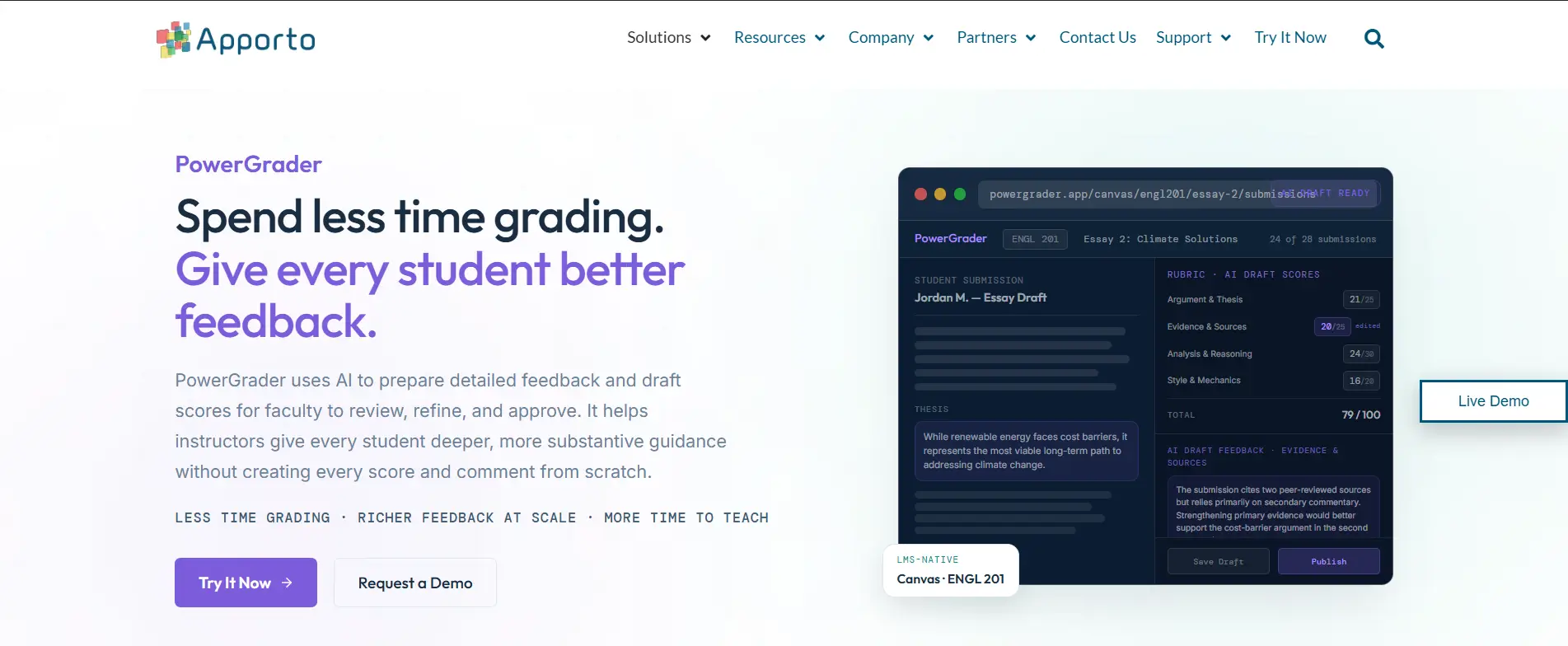
AI can take care of the initial grading work, but what happens when a suggested score doesn’t seem right? Teachers still need room to review answers, correct mistakes, and make the final call. Apporto PowerGrader helps with that. It uses your assignment rubric to prepare scores and feedback while keeping you involved in the grading process.
How Does PowerGrader Support Human Review Before Final Grades?
Here’s how PowerGrader works:
- Rubric-Based Evaluation: Suggests scores based on your grading criteria.
- AI-Assisted Feedback: Prepares comments explaining each evaluation.
- Instructor Review: Lets you accept, edit, or override suggested grades.
- LMS Integration: Works with supported learning management systems.
You can review and adjust the results before publishing grades, saving time without giving up control. Try Apporto PowerGrader
Final Thoughts
When it comes to AI grading vs manual grading, there’s no single answer. AI can save time on repetitive assessments, while teachers bring the judgment needed to understand more complex student work. What works best depends on your assignments and learning goals.
Start small. Try AI with lower-stakes assessments, check the results carefully, and keep teachers involved. Explore Apporto PowerGrader to see how both approaches can work together.
Frequently Asked Questions (FAQs)
1. Is AI Grading Faster Than Manual Grading?
Yes, AI grading can prepare scores and feedback faster than manual grading, particularly for assignments with clear grading criteria. But how much time will you actually save? That depends on the tool, assignment complexity, rubric, and how many corrections teachers need to make.
2. Is AI Grading More Accurate Than Human Grading?
No, AI grading isn’t automatically more accurate than human grading. It can follow a rubric consistently, but that doesn’t guarantee the right score. Teachers may catch subtle mistakes, understand unusual reasoning, and recognize correct answers that software might overlook.
3. Can AI Grading Replace Manual Grading Completely?
No, AI grading can’t fully replace manual grading, particularly for assignments requiring creativity or deeper interpretation. It can handle straightforward assessments and help evaluate written work, but teachers are still needed to understand context, recognize alternative answers, and make fair decisions.
4. What Is the Best Way to Combine AI and Manual Grading?
The best approach is to let AI prepare initial scores and feedback, then have teachers review the results. Check the actual submissions, fix any questionable evaluations, and approve final grades yourself. You save time without leaving important decisions entirely to software.
