

What Are the Pros and Cons of AI Grading?
The main pros of AI grading include faster assessments, consistent rubric-based scoring, reduced teacher workload, and quicker student feedback. Its cons include potential inaccuracies, bias, privacy concerns, and difficulty evaluating creativity and complex reasoning. Tools like Apporto PowerGrader help balance grading efficiency with human oversight and instructor control.
Grading a few essays is manageable. But when you’ve got an entire class’s papers to review, assignments piling up, and individual feedback to write, those hours add up quickly.
That’s partly why AI grading is attracting attention. It can help teachers get through repetitive grading tasks faster, apply rubrics more consistently, and prepare feedback without writing every comment from scratch.
Sounds promising. But can AI really recognize a clever argument or understand the reasoning behind an unexpected answer?
There are genuine concerns about fairness, accuracy, student privacy, and losing the personal judgment that teachers bring to assessment. This guide breaks down AI grading pros and cons, what research tells us, and how you can use these tools while keeping important grading decisions in your hands.
What Is AI Grading, and How Does It Work?

AI grading uses software to assess student work against set answers, grading rubrics, or assessment criteria. Depending on the tool, it can suggest scores, spot mistakes, and prepare written feedback, giving teachers a useful starting point instead of having to grade every submission from scratch.
For multiple-choice tests, traditional automated grading is fairly straightforward. There’s usually a correct answer to check against. Modern generative AI tools can tackle more complicated work, including essays and written responses.
Students submit their assignments, the system evaluates them using the grading criteria, and teachers check the suggested results before making final decisions.
How Is AI Grading Different From Human Grading?
The main difference lies in how each method judges student work.
| AI Grading | Human Grading |
|---|---|
| Uses automated rules or AI models to assess submissions | Relies on teacher knowledge and professional judgment |
| Can prepare scores and feedback quickly | Can understand context, creativity, and complex reasoning |
| Follows predefined assessment criteria | Can recognize unexpected but valid answers |
| Needs testing and review to check accuracy | May produce different scores between graders |
Both have their strengths. AI handles repetitive assessments efficiently, while teachers can pick up on subtle reasoning and unusual approaches that software might miss. Neither gets everything right, particularly with complex assignments.
What Are the Main Advantages of AI Grading?

Grading a handful of assignments isn’t too difficult. But when you’re dealing with regular assessments and hundreds of student submissions, the workload can quickly pile up. AI grading can make things easier by handling some of the repetitive tasks that take up so much of a teacher’s time.
How much it helps depends on the software, the assignments you’re grading, and how clearly your rubric explains what you’re looking for.
Here are six benefits worth knowing about:
- Faster Grading: AI can prepare initial scores and evaluations much quicker than marking every answer manually, particularly when assignments follow similar criteria.
- More Consistent Scoring: Using the same rubric across submissions can reduce differences in grading. Still, consistent scores aren’t necessarily accurate or fair.
- Quicker Student Feedback: Students may get comments sooner because teachers have AI-generated drafts to review instead of writing everything from scratch.
- Less Repetitive Work: Writing the same feedback again and again gets tiring. AI can prepare those initial comments, leaving you to make the necessary adjustments.
- Support for Larger Classes: Handling hundreds of submissions becomes more manageable when an AI tool can prepare evaluations across multiple assignments.
- More Time for Teaching: Fewer hours spent on routine grading could mean more time for answering questions, discussing difficult topics, and supporting students individually.
Perhaps the most practical benefit is having a first draft ready for review. If the suggestions are accurate and don’t require extensive corrections, you can save considerable time without giving up control over final grades.
What Are the Biggest Disadvantages and Risks of AI Grading?

Getting grades back faster sounds great, but speed doesn’t mean much if the scores aren’t right. AI grading can miss details that an experienced teacher would notice, particularly when students explain their ideas differently from what the system expects.
There are a few concerns worth considering before relying on automated evaluations:
- Questionable Accuracy: AI can misread an answer, overlook supporting evidence, or assign a score that doesn’t reflect the student’s actual understanding.
- Bias and Fairness Concerns: Biases in training data or grading rubrics may affect how the system evaluates different writing styles and responses.
- Difficulty Assessing Creativity: Students sometimes solve problems in unexpected ways. AI may struggle to recognize original thinking or unconventional but valid arguments.
- Privacy and Data Security: Sharing student assignments with external platforms raises questions about how personal information is collected, stored, and protected.
- Less Personal Interaction: Heavy reliance on automated comments may leave students with fewer chances to discuss mistakes and ask teachers for clarification.
- Dependence on Rubric Quality: If your grading criteria are unclear, AI can produce unreliable scores while appearing perfectly consistent.
Why Can AI Grading Be Inaccurate Even When It Uses the Same Rubric?
Using the same rubric for every submission sounds fair enough. But there’s a catch. Following consistent criteria doesn’t guarantee accurate judgment. AI might misunderstand a complex argument, overlook subtle reasoning, or give too much weight to grammar instead of the quality of ideas.
Research on automated essay scoring has raised concerns about reliability, validity, and fairness across different writing tasks. That’s why human review still matters, particularly when assessment results can affect a student’s academic future.
How Does AI Grading Compare With Human Grading?

When comparing AI grading vs. human grading, speed is only part of the story. What really matters is how well each approach understands student work and produces fair, useful evaluations.
AI can apply a rubric across hundreds of assignments without getting tired. Teachers bring something different to the table. They can recognize a clever argument, understand the context behind an answer, and give credit for reasoning that doesn’t follow the expected method.
Of course, human grading has its problems, too. Fatigue, personal judgment, and differences between graders can affect scores, especially when there’s a large stack of papers to review.
Is AI Grading More Consistent and Fair Than Human Grading?
AI can make grading more consistent, but that doesn’t automatically make it fairer. Both approaches have strengths and limitations.
| Evaluation Factor | AI Grading | Human Grading |
|---|---|---|
| Speed | Can evaluate submissions quickly | Usually takes longer |
| Consistency | Follows predefined grading criteria | Scores can vary between graders |
| Creativity | May overlook unusual reasoning | Can recognize original approaches |
| Bias | May reflect model or rubric biases | Can be influenced by personal judgment |
| Feedback | Generates structured draft comments | Provides guidance based on context |
| Accountability | Depends on system design and oversight | Teachers remain directly responsible |
Research published in 2026 found notable differences between AI-generated and human scores for extended written assignments, even when grading criteria were provided. That makes one thing clear: consistent scoring is useful, but you still need human judgment to check whether those scores are accurate and fair.
Can AI Grading Improve Feedback and Student Learning?

AI grading can help students receive feedback sooner, particularly during formative assessments, where the goal is to identify mistakes and improve understanding before the next assignment.
Instead of spending hours writing similar comments, you can use AI to flag recurring errors, point out missing evidence, or highlight explanations that need more detail.
Sounds helpful, right? It can be. But getting feedback quickly doesn’t mean students will automatically learn from it. A comment needs to explain what’s wrong and give students something practical to work on. Otherwise, it’s just another note they might read and forget.
Is AI-Assisted Feedback as Helpful as Teacher Feedback?
AI-assisted feedback can provide a useful starting point, but teachers have an advantage that software often lacks: classroom context.
You know which topics students have covered, where they’ve struggled, and how their understanding has developed. AI may miss those details or suggest improvements that don’t quite fit the assignment.
The Education Endowment Foundation emphasizes clear, actionable feedback that students have opportunities to use. Ultimately, good feedback should show students what worked, what needs attention, and what to try next. And they need time to act on it.
What Types of Assignments Are Best Suited for AI Grading?
Some assignments are a better match for AI grading than others. It largely comes down to how clearly you can define what a correct or successful answer should look like.
Take multiple-choice questions. There’s usually one correct answer, so traditional automated grading can handle them without much trouble. Essays and creative projects are a different story. You need to consider reasoning, originality, and how well students explain their ideas, which isn’t always easy for AI to judge.
Here’s how different assignments compare:
| Assignment Type | AI Grading Suitability | Important Consideration |
|---|---|---|
| Multiple-Choice Questions | High | Fixed answers are straightforward to score automatically |
| Short-Answer Questions | Moderate to High | Clear criteria help identify alternative but correct answers |
| Essays and Written Papers | Conditional | AI can evaluate rubric criteria, but teachers should check the results |
| Mathematical Problem-Solving | Conditional | The reasoning and steps taken can matter as much as the final answer |
| Creative Assignments | Limited | Original ideas and unusual approaches may be difficult for AI to assess |
| High-Stakes Exams | Requires strong safeguards | Fairness, reliability, transparency, and opportunities to appeal grades are essential |
Before using an AI grading system, think about what the assignment is actually testing. For routine practice, automated scoring or feedback may be perfectly useful. But when grades affect a student’s academic future, you’ll want careful human review before making the final decision.
Does AI Grading Really Save Time and Money?

AI grading can help schools save time and reduce grading costs, especially when teachers are working through hundreds of assignments. Instead of writing similar feedback over and over, you can use AI to prepare draft scores and comments, then review them before they’re shared with students.
But how much money does that actually save?
Well, it depends. Software subscriptions, setting up the system, preparing rubrics, and reviewing AI-generated grades all take time or money. For a large institution, the savings might be worthwhile. A smaller course may see less benefit.
What Costs Should Schools Consider Before Using AI Grading?
Before paying for an AI grading system, look beyond the promised grading speed. There are other expenses to consider.
| Potential Savings | Potential Costs |
|---|---|
| Less time writing draft feedback | Software subscriptions and licensing fees |
| Faster initial grading | Setup and integration expenses |
| Fewer repetitive grading tasks | Teacher training |
| More efficient assessment workflows | Reviewing scores and correcting mistakes |
| Handling larger numbers of submissions | Student data privacy and security requirements |
Big savings claims can sound convincing, but they don’t tell you what the tool will cost your school. Try it with a small group of assignments first. Compare the total grading time and expenses before and after using AI, including the time teachers spend checking and correcting its suggestions.
How Can Teachers Use AI Grading Responsibly?

AI grading can save you time, but you can’t simply accept every score it produces. Mistakes happen, and when those mistakes affect student grades, they need to be caught early.
A reliable process starts with clear grading criteria, regular checks, and teachers staying involved in important decisions. Here are six ways to use AI-assisted grading responsibly:
1. Start With a Clear Rubric: Spell out what you’re assessing, how marks are awarded, and what students need to demonstrate at each performance level.
2. Test the Tool First: Try it on a sample of assignments and compare its scores with your own before using it across an entire class.
3. Review Suggested Scores: Check the student’s original work rather than accepting the AI’s first evaluation without looking.
4. Watch for Bias and Inconsistency: Look for unusual scoring differences across writing styles or student groups, where appropriate and permitted.
5. Protect Student Information: Check how the platform collects, stores, and handles student data, and follow your institution’s privacy requirements.
6. Keep a Record of Decisions: Document grading changes and give students a way to question scores they believe are incorrect.
Not every platform offers a complete audit trail, so check that before relying on one. These practices reflect UNESCO’s emphasis on human oversight and student privacy, along with OECD guidance on fairness and transparency in automated assessment. AI can help with the grading work, but the responsibility for fair decisions should stay with teachers.
How Does Apporto PowerGrader Address Common AI Grading Concerns?
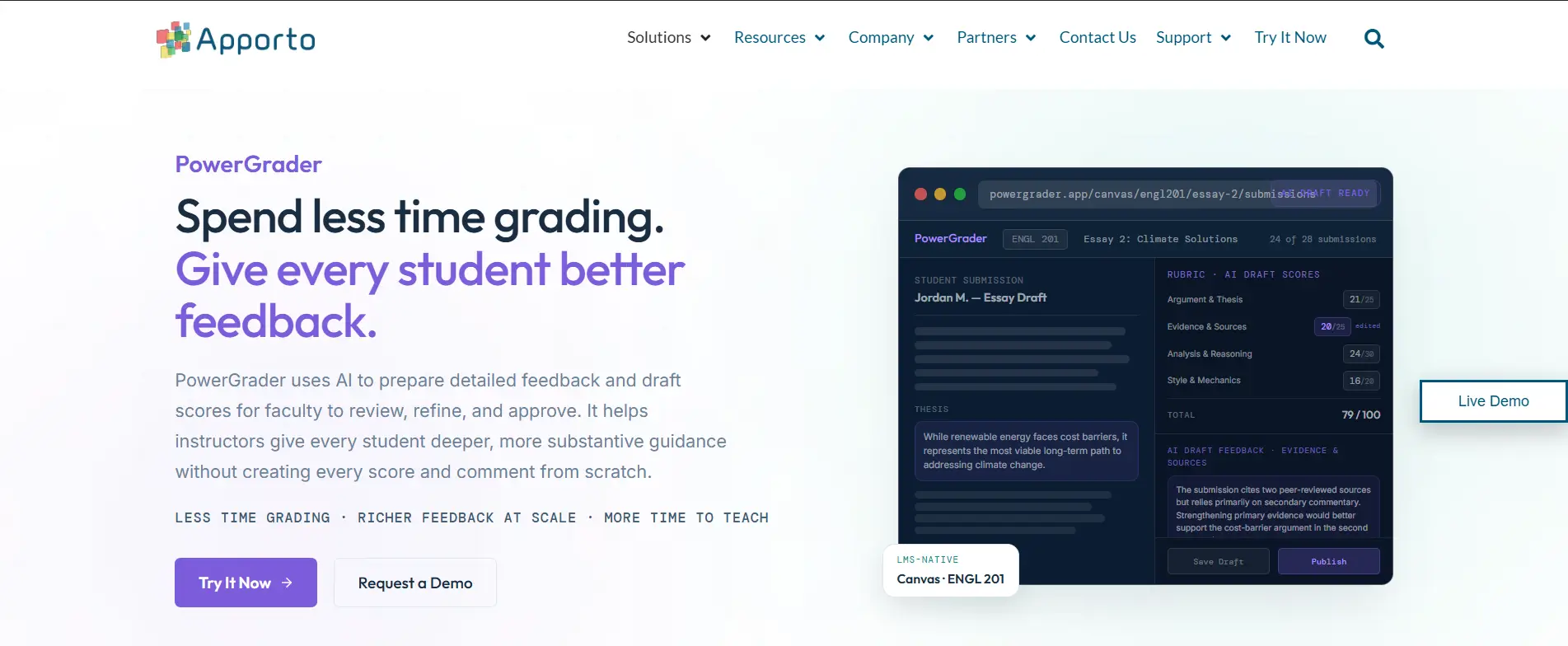
One concern with AI grading is handing over too much control. You need to understand how student work is evaluated, check the suggested scores, and correct anything that doesn’t seem right.
Apporto PowerGrader addresses this with a rubric-first grading process. It uses your assessment criteria to prepare draft grades and feedback, while keeping instructors responsible for final decisions. That means less time spent writing repetitive comments, without leaving important grading decisions entirely to AI.
How Does PowerGrader Keep Teachers in Control of Final Grades?
PowerGrader gives you several opportunities to review and refine the results:
- Rubric-Based Draft Grading: Prepares suggested scores and comments using the criteria you’ve already defined.
- Instructor Review: Lets you examine AI-generated evaluations before approving them.
- Editable Scores and Comments: Allows you to correct scores or improve feedback when something needs attention.
- LMS Integration: Connects assignments and grading results with supported learning management systems.
You still have the final say. PowerGrader handles the initial grading work, leaving you more time for thoughtful feedback and student support. Try Apporto PowerGrader
Final Thoughts
Looking at AI grading pros and cons, there’s plenty to consider. Faster grading, fewer repetitive tasks, and more consistent scoring can make life easier for teachers. Still, concerns about accuracy, bias, privacy, and meaningful student feedback aren’t going away.
The sensible approach? Start with lower-stakes assignments, see how the tool performs, and keep teachers involved in final decisions. If you’re exploring instructor-controlled AI grading, take a look at Apporto PowerGrader to see how it could fit your assessment process.
Frequently Asked Questions (FAQs)
1. What Are the Biggest Pros and Cons of AI Grading?
AI grading can save teachers time, make rubric-based scoring more consistent, and help students receive feedback sooner. The drawbacks? Potential inaccuracies, bias, privacy concerns, and difficulty understanding complex answers. That’s why human review remains important, particularly for more demanding assignments.
2. Is AI Grading More Accurate Than Human Grading?
AI grading isn’t always more accurate than human grading. Results depend on the software, assignment type, and quality of the rubric. AI may apply criteria consistently, but teachers are often better equipped to recognize creative arguments and subtle reasoning.
3. Can AI Grading Replace Teachers?
AI grading can handle parts of the assessment process, including preparing scores and written feedback, but it can’t fully replace teachers. You still need human judgment to understand classroom context, recognize individual learning needs, and make fair decisions about student performance.
4. What Are the Main Ethical Concerns With AI Grading?
The biggest ethical concerns around AI grading are bias, student privacy, transparency, and accountability. Schools need to protect student data, check for unfair scoring, and explain how grades are decided. Students should also be able to question results that seem incorrect.
5. Is AI Grading Suitable for Essays and Written Assignments?
AI grading can work well as a first step in assessing essays and written assignments, particularly when you’ve provided a clear rubric. However, original ideas, complex arguments, and factual accuracy still need attention. Teachers should review suggestions before approving final grades.
