

What Is AI Grading and How Does It Work?
AI grading uses artificial intelligence to evaluate student assignments, suggest scores, and generate feedback based on grading rubrics. Tools like Apporto PowerGrader help educators assess essays, coding tasks, and mathematical solutions faster while allowing instructors to review, adjust, and approve grades to maintain accuracy and fairness.
Grading a stack of assignments is rarely a quick job. Essays need careful reading, coding exercises require testing, and mathematical solutions often involve checking how students reached their answers.
Then comes the feedback. You need to explain mistakes, recognize good work, and give students something useful to improve on. With hundreds of submissions, that’s quite a workload. AI grading can take some of that pressure off. These systems analyze student work, suggest scores, and prepare feedback using your grading criteria.
Still, faster results don’t always mean better ones. Accuracy, fairness, student privacy, and academic judgment deserve just as much attention. In this blog post, you’ll learn how AI grading works, what it can realistically do for educators, and where human oversight remains essential.
What Is AI Grading, and How Is It Used in Education?

AI grading uses artificial intelligence to assess student work against defined grading criteria. It can suggest scores, identify mistakes, and prepare feedback. Some systems handle grading automatically, while others leave the final decision to instructors, helping make assessments faster and more consistent.
You’ll find AI grading being used in universities and online courses for quizzes, written assignments, and practice assessments.
It’s particularly useful in large classes, where reviewing every submission and writing individual comments can take considerable time. Of course, what the technology can handle depends on the platform.
What Is the Difference Between AI Grading and Traditional Automated Grading?
Traditional automated grading follows a set of rules. A multiple-choice test, for instance, gets marked against an answer key. Programming assignments may be checked using automated code tests.
AI grading can go further. It uses technologies such as machine learning and natural language processing to examine what students mean, rather than simply looking for matching answers.
That opens the door to evaluating essays and other written responses, although accuracy still varies.
Does AI Grading Replace Teachers or Assist Them?
AI grading is better suited to helping teachers than taking over their decisions. You can check suggested scores, fix errors, improve comments, and approve final grades yourself.
Apporto PowerGrader, for example, prepares rubric-based scores and detailed feedback for faculty review before results are published. The repetitive marking becomes more manageable, while the decisions that require academic judgment stay with you.
How Does AI Grading Work Step by Step?

AI grading follows a fairly straightforward process. You set the assessment criteria, students submit their work, and the system analyzes their answers before preparing scores and feedback.
The details vary depending on the assignment and software, but here’s how the process usually works:
1. Define Assessment Criteria: Start by creating an assignment and a grading rubric. This tells the system what students are expected to demonstrate and how marks should be awarded.
2. Collect Student Submissions: Students upload their essays, written answers, coding files, mathematical solutions, or other supported work.
3. Analyze the Submission: The AI examines the content using language models, predefined rules, or tools designed for specific assignment types.
4. Compare Work Against the Rubric: Each response is checked against your criteria to see how closely it meets the requirements.
5. Generate Draft Scores and Feedback: The system suggests grades and prepares comments highlighting strengths, errors, and areas needing improvement.
6. Review and Adjust: You examine the results, correct questionable scores, edit comments, or request another evaluation.
7. Publish Final Grades: Once you’re satisfied, approved scores and feedback are shared with students or returned to the course gradebook.
How Do AI Models Understand Student Responses?
AI grading uses natural language processing (NLP) to interpret written answers. Semantic analysis helps it examine meaning and context instead of merely matching keywords.
Language models can assess structure, relevance, and reasoning. Other tools run code tests or use computer vision to interpret scanned and handwritten submissions. Apporto PowerGrader uses a rubric-first process, connecting LMS submissions with AI-prepared evaluations that faculty review before approving final grades.
What Types of Assignments Can AI Grading Systems Evaluate?
AI grading isn’t limited to multiple-choice tests or short quizzes. Depending on the system, it can help evaluate essays, coding assignments, mathematical solutions, and even research projects.
Of course, not every assignment can be graded the same way. Checking a correct answer is fairly simple. Evaluating how a student developed an argument or solved a complex problem takes more careful analysis.
Here’s where AI and automated grading tools can help:
| Assignment Type | How AI or Automation Can Help | What Needs Attention |
|---|---|---|
| Multiple-Choice Questions | Check answers against an answer key | Correct answer keys |
| Short-Answer Questions | Assess meaning and rubric criteria | Other valid explanations |
| Essays | Review arguments, structure, and evidence | Creativity and academic judgment |
| Coding Assignments | Test code and examine explanations | Logic and code quality |
| Mathematics | Check calculations and reasoning | Different solution methods |
| Discussion Posts | Prepare feedback on contributions | Context and originality |
| Research Assignments | Examine structure and supporting arguments | Source reliability |
| PDFs and Spreadsheets | Analyze supported documents and calculations | Formatting and extraction errors |
| Projects and Portfolios | Assess work against multiple criteria | Complex grading requirements |
Why Are Objective Questions Easier to Grade Automatically?
Objective questions usually have a definite correct answer. A multiple-choice test, for example, can be checked against an answer key without much interpretation. Essays and open-ended questions are trickier. Two students might explain the same concept differently and still deserve similar scores.
AI can help assess these responses, but instructors need to check the reasoning behind suggested grades. Apporto PowerGrader supports essays, coding tasks, mathematics, and other academic submissions, allowing faculty to evaluate different assignment types using instructor-defined rubrics.
What Are the Main Benefits of AI Grading for Teachers and Students?

AI grading can take some of the workload off educators while giving students quicker access to feedback.
For large classes, especially, that’s a welcome improvement. Of course, the benefits depend on the assignments, the grading software, and how carefully instructors review the results.
How Much Time Can AI Grading Save Teachers?
Marking hundreds of assignments takes time. Add individual feedback to every submission, and the work can stretch over several days. AI grading can speed things up by preparing draft scores, checking rubric criteria, and suggesting comments across multiple assignments.
You still need to review the results, but you aren’t starting every evaluation from scratch. That leaves more room for teaching, helping struggling students, and giving difficult assignments the attention they deserve.
How Can AI Grading Improve Consistency Across Assignments?
Keeping grading standards consistent across a large class isn’t always easy. AI grading systems use predefined rubrics to assess submissions against the same criteria.
For essays, that might mean evaluating argument quality, supporting evidence, and organization using a shared scoring framework. Still, consistency has its limits. A system can apply the same criteria repeatedly and still get something wrong. Faculty review remains important.
How Does AI Grading Help Students Receive Better Feedback?
A score tells students where they stand. Good feedback tells them what to work on next.
AI grading can help by providing:
- Faster responses: Students can revisit mistakes sooner.
- Detailed comments: Feedback relates to specific rubric criteria.
- Clear explanations: Missing evidence and errors are easier to identify.
- Consistent guidance: Similar expectations apply across submissions.
- Practical next steps: Students can use suggestions in future assignments.
Apporto PowerGrader, for example, prepares rubric-aligned feedback that instructors can edit before sharing. The aim is simple: give students useful guidance without adding hours of repetitive marking.
How Accurate Is AI Grading Compared With Human Grading?

AI grading can be accurate, but a lot depends on what you’re asking it to evaluate. Checking a straightforward answer is one thing. Judging a student’s reasoning, originality, or understanding of a complex topic is another.
Accuracy also depends on the AI model, grading rubric, subject, and how closely its scores match those assigned by experienced instructors.
What Factors Affect AI Grading Accuracy?
Several things can influence how well an AI grader performs:
- Rubric Clarity: Clear grading criteria help the system understand what’s expected.
- Answer Complexity: Detailed arguments are harder to assess than fixed answers.
- Subject Knowledge: Specialized topics require a deeper understanding of the material.
- Submission Quality: Blurry scans, missing pages, or unusual formatting can affect results.
- Model Validation: Comparing AI scores with instructor grades helps uncover mistakes.
- Human Grading Variation: Even experienced teachers sometimes interpret the same rubric differently.
So, an accuracy figure from one course doesn’t necessarily tell you how the system will perform elsewhere.
Can AI Grade Essays as Accurately as Human Instructors?
AI can assess grammar, structure, and coherence fairly well in some settings. But recognizing original thinking and strong academic reasoning is much harder. A May 2026 University of Cambridge study found that tested AI models matched human-awarded degree classification bands in only 35–65% of undergraduate psychology essays.
Researchers also observed that polished writing sometimes received more credit than its academic substance warranted. These findings don’t apply to every AI grading system, but they highlight why universities need to test grading accuracy and review suggested scores before approving final grades.
Can AI Grade Essays, Short Answers, and Creative Work Fairly?

Not every good answer looks the same. Two students might approach a question differently, use different arguments, and still demonstrate a solid understanding of the topic. That’s what makes grading essays, short answers, and creative work tricky.
AI grading can help evaluate these submissions, but fairness depends on how well it recognizes different approaches without overlooking the original purpose of the assignment.
How Does AI Evaluate Essay Structure, Arguments, and Writing Quality?
AI grading systems use language models and semantic analysis to examine written responses, looking at both the content and how ideas are presented.
They can evaluate several areas:
- Organization: Are ideas presented in a clear order?
- Coherence: Do the arguments connect logically?
- Relevance: Does the answer address the question?
- Evidence: Are claims supported with appropriate information?
- Writing Quality: Is the language clear and grammatically sound?
Still, a well-written essay isn’t necessarily a well-reasoned one. Good grammar can only tell you so much.
Why Is Creativity Harder for AI to Grade?
Creative work rarely follows a neat formula. Students may develop unusual arguments, explore different interpretations, or solve problems in ways the system doesn’t expect.
AI can sometimes favor familiar answers and miss the value of an original approach. For assignments where creativity matters, educator judgment is especially important.
How Should Teachers Review AI Scores for Subjective Assignments?
Check whether the suggested scores reflect your rubric and the student’s actual reasoning. Look closely at supporting evidence, alternative explanations, and feedback that seems questionable.
Apporto PowerGrader allows instructors to edit rubric-level comments and request targeted regrading without repeating the entire evaluation. That gives you room to correct mistakes while keeping final grading decisions in your hands.
How Can AI Grading Improve Feedback and Student Learning?

Getting a grade is one thing. Understanding why you earned it, and what you could do better next time, is another.
AI grading can help bridge that gap by identifying mistakes, recognizing strengths, and preparing detailed feedback that students can actually learn from.
What Does Useful AI-Generated Feedback Look Like?
Useful feedback gets specific. It points to something in the student’s work and explains what needs attention.
Consider the difference:
- Generic feedback: “Your argument needs improvement.”
- More useful feedback: “Your conclusion summarizes the topic, but it doesn’t connect the evidence back to your main argument.”
The second comment gives students something concrete to work on. Tools like Apporto PowerGrader can prepare evidence-linked, rubric-based comments that instructors review and adjust before sharing.
That way, students receive feedback connected to their actual submissions rather than vague advice.
How Can AI Grading Identify Common Learning Gaps?
Sometimes, the same mistakes appear across an entire class. Students might struggle to support arguments with evidence, repeat calculation errors, or misunderstand a programming concept.
By analyzing these patterns, AI grading systems can help you spot where students are getting stuck. You can then revisit difficult topics, adjust lessons, or provide extra practice where it’s needed most.
Can Faster Feedback Support Personalized Learning?
Quick feedback gives students a chance to revisit mistakes while the assignment is still fresh in their minds.
You can recommend specific exercises, revision tasks, or additional resources based on their performance. Of course, feedback only helps when students understand it and put it to use.
How Does AI Grading Compare With Traditional Teacher Grading?
Teachers bring something important to grading: experience, subject knowledge, and an understanding of how students learn. They can recognize original ideas, consider unusual answers, and judge work within its academic context.
AI grading approaches the task differently. It uses automated analysis and grading rubrics to prepare scores and feedback, taking some of the repetitive work off your plate. Here’s how the two compare:
| Grading Factor | Traditional Teacher Grading | AI-Assisted Grading |
|---|---|---|
| Initial Grading Speed | Depends on workload | Prepares draft scores faster |
| Rubric Application | Guided by teacher judgment | Uses predefined criteria |
| Written Feedback | Written by instructors | Drafted for faculty review |
| Subject Expertise | Draws on academic experience | Depends on model capabilities |
| Creative Responses | Can recognize originality | May overlook unusual answers |
| Consistency | Can vary between graders | Applies criteria systematically but can make mistakes |
| Grading Bias | Human judgment can introduce bias | Training data and models may introduce bias |
| Large Classes | Takes considerable time | Can process many submissions |
| Final Accountability | Rests with educators | Should remain with educators |
Neither approach is perfect. A teacher can understand context that an AI grader might miss. On the other hand, AI can work through hundreds of submissions without the same manual effort.
Combining the two makes sense. Apporto PowerGrader, for instance, uses instructor-defined rubrics to prepare draft scores and comments. Faculty can then check, edit, and approve those results before they’re published.
You get help with the time-consuming parts of grading while keeping academic judgment and final decisions where they belong, with educators.
What Are the Biggest Limitations and Risks of AI Grading?

AI grading can take hours of repetitive work off an instructor’s schedule. But there’s a catch. The technology can make mistakes, and those mistakes can affect students’ grades.
Before introducing AI grading, universities need to understand where things can go wrong. Here are some concerns worth paying attention to:
- Incorrect Scores: AI might misunderstand a valid answer, overlook important reasoning, or assign an unfair grade.
- Biased Evaluation: Writing styles, language patterns, and student backgrounds can influence how models assess responses.
- Limited Subject Understanding: Highly specialized topics may be difficult for general-purpose AI systems to evaluate accurately.
- Creativity and Originality: A correct but unconventional answer might receive less credit than it deserves.
- Generic Feedback: Some tools produce comments that sound helpful but don’t explain what students should improve.
- Fabricated Explanations: AI can give convincing reasons for a grade, even when those explanations don’t match the student’s work.
- Limited Transparency: Understanding why a particular score was assigned isn’t always straightforward.
- Overreliance on AI: Instructors may accept suggested grades without checking the actual submissions.
- Privacy Risks: Using unapproved grading tools could expose sensitive student information.
These aren’t imaginary concerns. A 2026 study on rubric-guided AI grading found that AI-generated explanations sometimes invented rubric details to justify incorrect scores. Careful testing, approved tools, and faculty training can help reduce these risks. Above all, human review should remain part of the grading process.
How Can Teachers Use AI Grading Without Losing Academic Judgment?

AI can handle parts of the grading workload, but deciding what a student deserves still calls for a teacher’s judgment.
Think of AI-generated scores as a starting point. You need to check the reasoning, consider the academic context, and make sure the suggested grades reflect what students actually demonstrated.
Why Should Teachers Review AI-Generated Grades?
Even a capable AI grader can misread an answer or apply a rubric incorrectly. When checking its work, pay attention to:
- Factual Accuracy: Has the system understood the student’s response correctly?
- Rubric Alignment: Did it follow your grading criteria?
- Alternative Answers: Were other valid explanations given proper credit?
- Feedback Quality: Are the comments useful, fair, and supported by the submission?
Borderline scores and unusual answers deserve a closer look, particularly in high-stakes assessments. And a confident explanation from AI isn’t proof that the grade is right.
How Can Rubrics Make AI-Assisted Grading More Reliable?
A grading rubric spells out what students are expected to demonstrate and how marks are awarded. The clearer those expectations, the easier it is to evaluate work consistently.
Before using a rubric across an entire class, test it against sample submissions and fix any vague criteria. Apporto PowerGrader follows this rubric-first approach, letting instructors edit individual scores and request targeted regrading.
Who Should Have the Final Say on Student Grades?
Final grades should remain the responsibility of authorized educators and institutions. Instructors need to approve results, keep records of important changes, and give students a fair way to question their grades. AI can help with the heavy lifting. Academic accountability, though, stays with people.
How Can Universities Protect Student Data When Using AI Grading?

AI grading systems handle more than assignments and scores. They also work with student records, instructor comments, and sometimes sensitive academic information.
That raises an important question: where does all that data go? Before introducing an AI grading platform, universities should understand what it collects, how it protects information, and who gets access.
What Student Information Might AI Grading Tools Process?
Depending on the platform, AI grading tools may process student names, course information, assignment submissions, grading rubrics, draft scores, final grades, and instructor feedback.
Some files might contain personal details, unpublished research, or other confidential material. Not every platform collects the same information, though. That’s why checking a provider’s data policies matters before uploading student work.
What Security and Privacy Controls Should Institutions Require?
Look for safeguards that protect student information throughout the grading process:
- Access Controls: Only authorized staff should view academic records.
- Encryption: Protect data while it’s stored and transferred.
- Data Retention: Know how long information is kept and when it’s deleted.
- AI Training Restrictions: Prevent student work from being used to train models without authorization.
- Vendor Agreements: Clarify how providers handle institutional data.
- Activity Logs: Keep records of who accesses sensitive information.
- Regulatory Compliance: Check applicable student privacy requirements.
According to Apporto, PowerGrader doesn’t use student information to train its AI models. Universities should still verify the provider’s security documentation against their own policies.
How Can Institutions Use AI Grading Transparently?
Students deserve to know when AI helps assess their work, what information is collected, and who approves their grades. Explain these practices clearly, including how students can request a review. Clear communication makes the grading process easier to understand and trust.
How Can Institutions Use AI Grading Transparently?
Students should understand when AI assists with grading, what information is processed, and who approves their final scores.
Clear policies should also explain how students can question grades or request a review. Transparency helps build trust while keeping educators accountable for assessment decisions.
What Features Should You Look for in an AI Grading System?
A fast AI grader sounds appealing, but speed alone shouldn’t decide which platform you choose.
You’ll want something that handles your assignments properly, follows your grading rubrics, and keeps student information secure. Just as importantly, instructors need room to question scores and make the final call.
And then there’s the cost, especially when you’re grading across several courses. Here’s what to look at:
| Feature | What to Evaluate |
|---|---|
| Rubric-Based Grading | Supports your own grading criteria |
| Assignment Compatibility | Handles essays, code, mathematics, and documents |
| Feedback Quality | Provides specific comments backed by student work |
| Preliminary Scoring | Prepares draft scores for each criterion |
| Instructor Control | Lets faculty edit and approve grades |
| Targeted Regrading | Allows individual criteria to be reassessed |
| Accuracy Validation | Compares AI scores with instructor evaluations |
| LMS Integration | Imports submissions and returns approved grades |
| Transparency | Explains why scores were suggested |
| Consistency | Evaluates similar responses using shared standards |
| Student Privacy | Protects records and manages data retention |
| Scalability | Handles large classes and grading queues |
| Pricing | Covers licensing, usage, setup, and support costs |
Don’t take impressive accuracy claims at face value. Try the system with actual course assignments, approved rubrics, and appropriately protected student work. Compare its feedback and scores with those from experienced instructors.
You’ll get a much better sense of how reliable it is, how much time it saves, and whether it’s worth the investment.
How Can AI Grading Fit Into Your Existing Teaching and Assessment Workflow?

Adding another platform to your teaching routine can feel like more work than it’s worth. That’s why AI grading should fit into the tools you already use, from creating assignments and collecting submissions to reviewing scores and publishing feedback. The less back-and-forth between systems, the easier it is to manage assessments.
How Do AI Grading Tools Integrate With Learning Management Systems?
Many AI grading platforms connect directly with learning management systems (LMS), so you don’t have to move assignments and student files manually. These integrations can bring submissions and rubrics into the grading tool, then send approved scores and comments back to your course gradebook.
Apporto PowerGrader supports two-way integrations with Canvas, Brightspace, Anthology, and Moodle. Still, integrations aren’t identical across platforms. Check what actually works with your LMS before committing.
How Can Instructors Review AI Grades Without Doubling Their Workload?
Nobody wants to spend more time checking AI-generated grades than they would grading assignments themselves. A useful system should provide organized grading queues, editable feedback, and scores broken down by rubric criteria.
That lets you focus on questionable evaluations, correct mistakes, and give unusual responses a closer look. How much time you save depends on the quality of those initial evaluations.
What Does a Practical AI-Assisted Grading Workflow Look Like?
You create the assignment and rubric, students submit their work, and AI prepares draft scores and comments. From there, you review the results, make adjustments, and approve final grades. The approved feedback returns to your LMS, without creating a separate grading routine.
How Does Apporto PowerGrader Help Educators Grade Assignments?
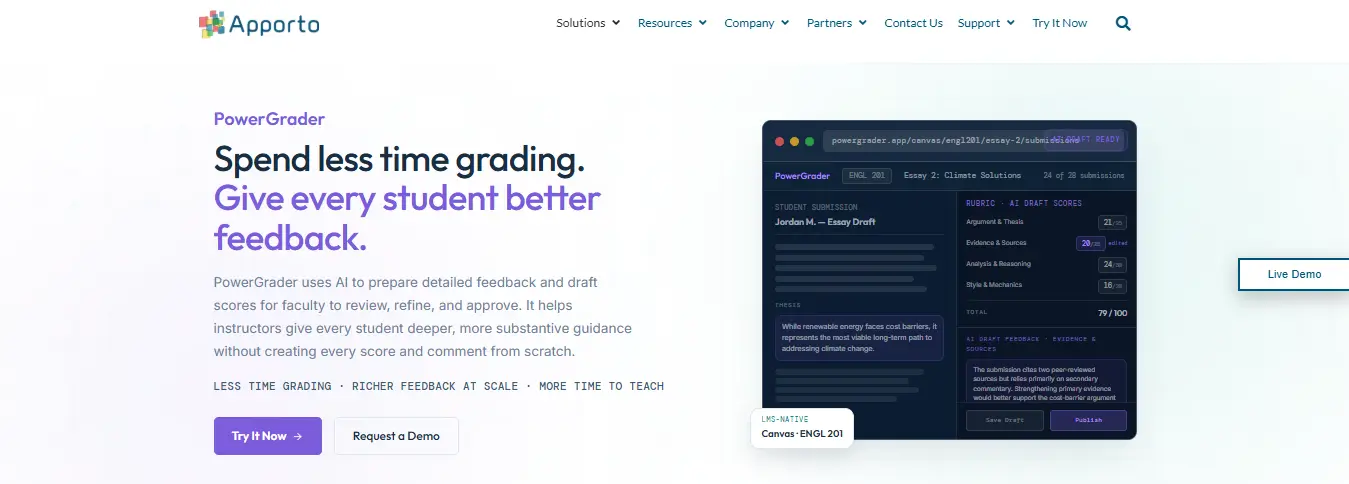
Apporto PowerGrader helps educators get through grading without spending hours on repetitive marking. It works with your existing rubrics to prepare draft scores and detailed feedback. You can review the results, make corrections, and approve final grades before anything reaches students.
How Does PowerGrader Generate Rubric-Based Scores and Feedback?
PowerGrader handles the initial evaluation while giving faculty control over the results. Here’s what it offers:
- Rubric-First Grading: Prepares scores for each assessment criterion.
- Detailed Feedback: Highlights strengths, mistakes, and supporting evidence.
- Faculty Review: Lets you edit grades, adjust comments, and request targeted regrading.
- Grading Queue: Keeps submissions organized for review.
- LMS Integration: Brings in assignments and returns approved results.
- Assignment Support: Handles essays, code, mathematics, spreadsheets, and supported documents.
Why Is PowerGrader Useful for Large Classes and Faculty Workloads?
With hundreds of submissions, writing similar comments over and over gets tiring. PowerGrader takes care of the first pass, leaving you more time to examine difficult answers and provide meaningful feedback. Apporto reports the following results from its DeVry University implementation:
- 96.6% of AI-generated draft grades were accepted by faculty.
- 88.7% of criterion-level evaluations and feedback were retained.
Those figures come from one implementation, so results elsewhere may differ. The appeal is straightforward: less repetitive work, with educators still making the final call.
How Can Universities Introduce AI Grading Responsibly?
Bringing AI grading into a university isn’t something you want to rush. There are academic standards to protect, faculty to train, and student data to keep secure. Plus, the software needs to work with the assignments your instructors actually use.
A small trial before a university-wide rollout can save plenty of trouble later. Here are six steps worth following:
1. Identify Suitable Assessments: Start with assignments that have clear grading criteria, such as structured essays, short answers, or well-defined technical tasks.
2. Prepare Clear Rubrics: Spell out what students need to demonstrate, how marks are awarded, and what different performance levels look like.
3. Evaluate Approved Tools: Compare grading accuracy, privacy safeguards, accessibility, LMS compatibility, and costs. Don’t rely on marketing claims alone.
4. Run a Pilot: Test AI-generated scores and feedback against assessments graded by experienced faculty. Look closely at disagreements.
5. Train Faculty: Show instructors how to review suggested grades, correct errors, approve results, and record important changes.
6. Monitor Outcomes: Keep checking grading accuracy, feedback quality, time savings, student concerns, and appeals.
And don’t stop evaluating after launch. Faster grading is useful, certainly. But the bigger question is whether the technology helps educators assess work fairly and gives students better feedback.
Final Thoughts
AI grading can make a real difference to how educators manage assignments. Less time spent on repetitive marking, quicker feedback, and more consistent grading are all worth considering. Automated scoring handles straightforward questions well, while AI-assisted grading can help with essays and more complex work.
But accuracy still matters. Clear rubrics, faculty oversight, and proper data protection shouldn’t be overlooked. Apporto PowerGrader helps by preparing rubric-based scores and feedback that instructors can check, adjust, and approve before students receive their grades.
You get some of that grading time back without handing over academic decisions to software. Looking to make grading less time-consuming? Explore Apporto PowerGrader and see how it fits your university’s assessment needs.
Frequently Asked Questions (FAQs)
1. What Is AI Grading?
AI grading uses artificial intelligence to evaluate student work, suggest scores, and prepare feedback based on grading criteria. It can take some of the repetitive marking work off teachers’ hands, giving them more time to review assignments and help students improve.
2. Can AI Grade Essays Accurately?
AI can assess essay structure, grammar, clarity, and arguments, but it doesn’t always get everything right. Original ideas and complex reasoning can be tricky to judge. That’s why instructors should check suggested scores before making them final.
3. Does AI Grading Replace Teachers?
AI grading is designed to help teachers, not take their place. It can handle initial evaluations and draft feedback, but educators still need to check the results, correct mistakes, and decide what grades students ultimately receive.
4. How Does AI Grading Provide Feedback to Students?
AI grading systems compare student submissions against a grading rubric to identify mistakes, strengths, and areas needing improvement. They prepare comments explaining what worked and what didn’t, which teachers can review before students receive their feedback.
5. Is AI Grading Fair and Reliable?
AI grading can support fairer, more consistent assessments, but results depend on the system and how it’s used. Clear rubrics, proper testing, and regular instructor reviews help catch mistakes and reduce the risk of biased or inaccurate grades.
